Retail Patch Management for IT Managers: A Practical Guide
- Sosa Solutions NYC
- Jul 28
- 14 min read

A retail-focused, risk-based patch management program aligned to PCI DSS and NIST SP 800-40 Rev. 4, driven by CVE advisories and integrated with your ITSM platform, is the single most effective way to protect store systems, maintain transaction uptime, and satisfy auditors. Here is the six-step checklist to start applying today:
Inventory — Discover every asset: POS terminals, payment modules, kiosks, network gear, OS instances, and firmware versions.
Monitor — Subscribe to vendor PSIRTs, CISA advisories, and CVE feeds for continuous patch notification.
Prioritize — Score vulnerabilities using CVSS layered with exploit availability and asset criticality (PCI scope first).
Test — Validate patches in a staging environment that mirrors production, including synthetic payment transactions.
Deploy — Roll out in rings: non-peak stores first, then broader, with automated ITSM-ticketed change records.
Verify and report — Confirm patch success on every endpoint, log results, and generate compliance evidence for auditors.
Reference NIST SP 800-40 Rev. 4 for remediation timeline guidance, CISA’s Known Exploited Vulnerabilities (KEV) catalog for prioritization, and PCI DSS Requirement 6 for patch scope and evidence expectations.
Table of Contents
Why retail patch management carries higher stakes than most industries
Core stages of a retail patch program that actually holds together
Testing, canary rollouts, and rollback procedures for POS and firmware
What to require from patch management tooling in a retail environment
Meeting PCI DSS and auditor expectations for evidence and reporting
What most retail patch programs get wrong, and how to fix it
Sosasolutionsnyc helps retail stores stay patched and operational
Why retail patch management carries higher stakes than most industries
Retail IT is not a typical enterprise environment. A single store runs POS terminals, payment card readers, receipt printers, barcode scanners, back-office servers, Wi-Fi access points, digital signage, and often a cloud-connected ERP, all of which represent potential entry points. Payment data flows through most of them. That attack surface is wide, distributed across dozens or hundreds of locations, and largely customer-facing.
The business impact of a patch failure or a successful exploit is immediate and visible. A compromised POS system can halt every transaction in a store within minutes. A ransomware infection that spreads through unpatched network gear can take an entire region offline during a Saturday rush. Common retail IT failures like these are not hypothetical; they follow predictable patterns that a structured patch program directly addresses.

Retail also operates under compliance obligations that most industries do not share in the same form. PCI DSS Requirement 6 mandates that organizations protect systems and software against known vulnerabilities by installing applicable security patches and updates. Failure to demonstrate a documented, timely patch program is a finding in any QSA assessment.
Pro Tip: Treat Black Friday, Cyber Monday, and peak holiday windows as hard maintenance blackouts. Predefine compensating controls for any asset that cannot be safely patched before those periods, and document those controls explicitly. Auditors expect to see them.
Operational constraints compound the risk. Most stores cannot tolerate a reboot during business hours. Overnight windows are short and vary by location. Seasonal hiring means staff turnover is high, so institutional knowledge about patch procedures is thin on the ground. A retail IT patch management checklist that ignores these realities will fail in practice, regardless of how sound it looks on paper.
Core stages of a retail patch program that actually holds together
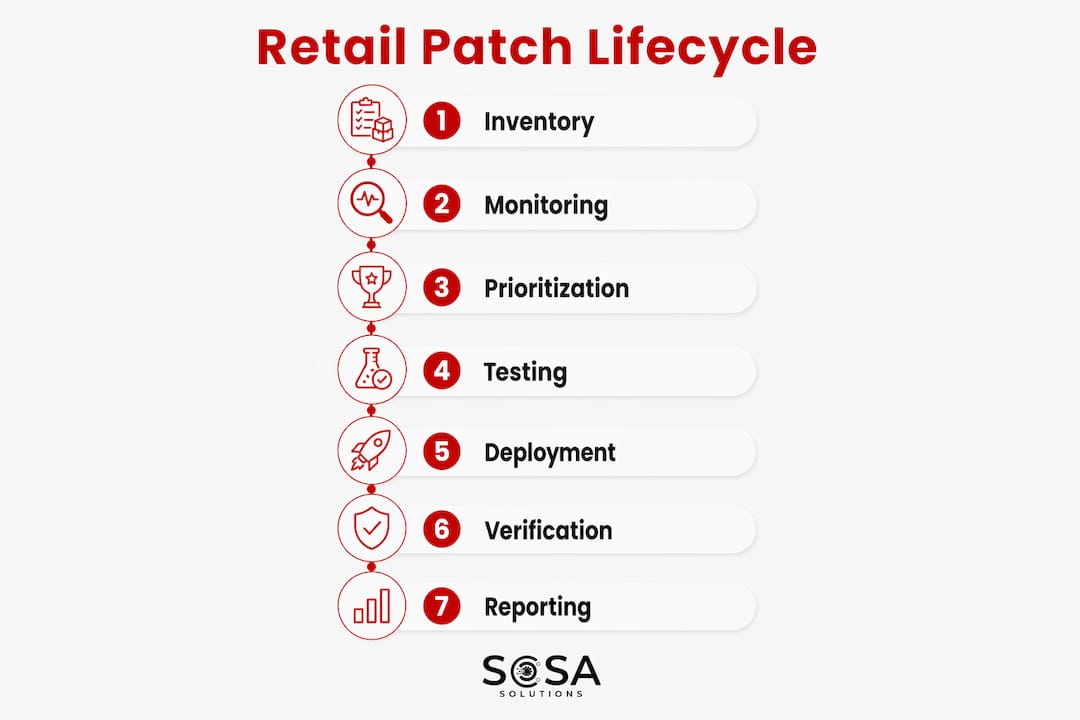
The patch management process follows a defined lifecycle, and retail adds specific ownership and operational constraints at each stage. Here is how each stage maps to a real retail environment.
1. Asset inventory and discovery
Owner: Central IT, with store ops confirming physical devices. Output: A complete, tagged asset register covering OS versions, firmware, PCI scope flag, and network segment.

The most common failure here is inventory drift. A POS terminal gets swapped after a hardware failure, and nobody updates the register. Firmware on payment peripherals gets skipped because it requires a vendor tool most teams do not have installed. Automate discovery with an agent-based tool where possible, and schedule quarterly physical audits for devices that agents cannot reach. The retail IT asset management process is the foundation everything else depends on.
2. Patch monitoring and notification management
Owner: Security team, with vendor liaison from central IT. Output: A prioritized patch queue updated at least weekly, with critical advisories triggering same-day review.
Subscribe to vendor PSIRTs for every product in your environment: Microsoft, your POS software vendor, payment terminal manufacturer, and network hardware vendor. Layer in CISA advisories and the KEV catalog. Raw CVSS scores alone are not enough; prioritization models that add exploit availability and business context consistently outperform CVSS-only approaches.
3. Risk-based prioritization
Owner: Security team with sign-off from IT leadership. Output: A severity-tiered patch list with assigned SLA deadlines and responsible owners.
Score each patch against four factors: CVSS base score, exploit availability (is it in the KEV catalog?), asset criticality (PCI scope, internet-facing, customer-data handling), and business impact of patching failure. Assign SLA timelines from that score, not from the vendor’s release schedule alone.
4. Controlled testing and staging
Owner: Central IT, with business sign-off for payment-critical changes. Output: A test report confirming patch behavior, integration stability, and rollback readiness.
For ERP and POS patches, DevOps automation enables consistent environment provisioning and automated validation, including synthetic business transactions that cover order creation, refunds, inventory sync, and financial posting. A patch that passes a basic smoke test but breaks end-of-day reconciliation will not surface until it is already in production.
5. Deployment using rings and canary stores
Owner: Central IT with store ops coordination. Output: Staged deployment records with per-store confirmation and ITSM change tickets.
Start with a canary group: two or three low-traffic stores during off-peak hours. Confirm success before expanding to a regional ring, then full rollout. Every deployment generates an ITSM change ticket with timestamps, patch IDs, affected assets, and the technician or automation job that executed it.
6. Post-deployment verification
Owner: Central IT and store ops. Output: Per-asset verification records confirming patch installation, system stability, and transaction processing.
Do not rely on the patch tool’s success flag alone. Run retail system monitoring checks: confirm the POS can process a test transaction, verify network connectivity, and check that any integrated services (loyalty, inventory sync, payment gateway) are responding normally.
7. Reporting and audit trail
Owner: IT leadership and compliance team. Output: A complete patch record per endpoint, including failures, exceptions, compensating controls, and timestamps.
Every endpoint’s patch history must be reconstructable from your records. That means logging successful deployments, failed attempts, exception grants, and any compensating controls applied. Retail IT best practices consistently list structured patch documentation as a core control alongside inventory and configuration standards.
Pro Tip: Inventory drift and missing firmware on POS peripherals are the two places retail patch programs fail most often. Automate discovery for what you can, and build a manual firmware audit into your quarterly calendar for devices that sit outside agent coverage.
How to prioritize patches and build a 30/60/90 starter plan
High-performing retail teams do not patch everything at once. They build patching capacity maps that capture store-level constraints and use exploit intelligence beyond raw CVSS scores to route remediation tasks to the right owner fast.
Prioritization model — four layers:
CVSS base score — starting point, not the final word.
Exploit availability — is the vulnerability in CISA’s KEV catalog? If yes, treat it as critical regardless of CVSS.
Asset criticality — PCI-scoped assets, internet-facing systems, and customer-data handlers get the shortest SLAs.
Business impact — what breaks if the patch fails? A POS terminal is higher priority than a back-office printer.
Sample SLA timelines for retail, based on severity classifications, include tighter deadlines for critical vulnerabilities and progressively longer remediation windows for lower severity categories.
Severity | Remediation SLA | Notes |
Critical | 48–72 hours | KEV-listed or high CVSS; compensating controls required if SLA cannot be met |
High | 7 days | Moderate CVSS; escalate if asset is PCI-scoped |
Medium | 30 days | Lower CVSS; batch with scheduled maintenance windows |
Low | 90 days | CVSS below 4.0; address in quarterly cycles |
The patching capacity map captures what each store can realistically support. For each location, record: available maintenance window (days and hours), whether on-site support is needed or remote is sufficient, network and backup constraints that affect patch delivery, and any compensating controls already in place for assets that cannot be patched on schedule. This map closes the gap between security team timelines and what store operations can actually execute.
30/60/90-day starter plan:
Phase | Actions | Sign-off |
Day 1–30 | Complete asset discovery; define critical/high SLAs; identify PCI-scoped assets; apply all KEV-listed patches immediately; document exception workflow | IT Director |
Day 30–60 | Deploy patch tooling; integrate with ITSM; build staging environment; run first canary deployment; train store ops on patch windows | IT Director + Security |
Day 60–90 | Automate recurring patch cycles; baseline KPIs (patch success rate, time-to-remediate); produce first monthly compliance report | IT Director + Leadership |
Testing, canary rollouts, and rollback procedures for POS and firmware
A patch that works in staging and breaks in production is a patch program failure, not a patch failure. The difference is usually in how closely the test environment mirrors real store conditions.
Step-by-step testing checklist:
Provision a staging environment that matches production: same OS version, same POS software build, same payment module firmware.
Apply the candidate patch to staging.
Run integration tests: confirm payment processing, inventory sync, loyalty program connectivity, and fulfillment workflows.
Execute synthetic business transactions covering purchase, refund, void, and end-of-day reconciliation.
Run smoke tests on all networked peripherals (receipt printers, barcode scanners, cash drawers).
Obtain business sign-off from the store operations lead before promoting to production.
Document test results, including any failures and how they were resolved.
Canary and rolling deployment patterns:
Select two or three low-traffic stores as your canary group. Deploy during their off-peak window and monitor for 24–48 hours before expanding.
For cloud ERP components, patch a secondary tenant or non-peak region first.
Use deployment rings: canary → regional pilot → full rollout. Each ring requires a verification gate before the next ring opens.
For firmware updates on payment terminals, always confirm the vendor’s rollback procedure before starting. Some firmware updates are one-way without a full device restore.
Rollback triggers and procedures:
Trigger rollback if: transaction processing fails post-patch, a device fails to boot, integration errors exceed a defined threshold, or store ops reports customer-facing failures.
For OS and application patches, restore from the pre-patch snapshot or system image.
For firmware, follow the vendor’s recovery procedure. If remote recovery is not possible, dispatch on-site support. Cloud backup practices and image hygiene directly determine how fast you recover.
Pro Tip: Maintain a current, tested system image for every POS terminal model in your fleet. A firmware update that leaves a device unbootable is recoverable in under an hour if you have a clean image and a USB recovery drive staged at the store. Without it, you are waiting for a technician and a replacement unit.
What to require from patch management tooling in a retail environment
Automation replaces manual, environment-specific scripts with policy-driven patch workflows that integrate with ITSM to reduce operational downtime. The tooling you choose needs to handle the specific constraints of a distributed retail estate.
Feature checklist for retail patch tooling:
Multi-OS and firmware coverage (Windows, Linux, macOS, network OS, POS-specific platforms)
Deployment ring support with configurable promotion gates
Off-network client handling for stores that lose connectivity during patch windows
Agent health monitoring with alerting for unreachable endpoints
Rollback support at the OS, application, and firmware level
Native ITSM integration (ServiceNow, Jira Service Management, or equivalent) for automated ticket creation and closure
Asset-context enrichment: PCI scope flag, location, criticality tier
Audit-ready reporting with per-endpoint patch history, failure logs, and exception records
Integration requirements:
Connect patch tooling to your ITSM platform so every deployment creates a change record automatically.
Feed patch status data to your SIEM for correlation with security events.
Sync asset inventory between the patch tool and your CMDB to prevent drift.
Establish a vendor notification process: subscribe to PSIRTs and map each vendor’s advisory format to your intake workflow.
For retail IT infrastructure with many distributed endpoints, tooling that supports off-network devices, deployment rings, and API-driven automation is not optional. A tool that requires every device to be on the corporate network during patch windows will leave your off-hours stores uncovered. Managed patch approaches for multi-location retail and wholesale environments address exactly this constraint by handling endpoint reachability and scheduling across distributed sites.
Vendor selection criteria for retail:
Demonstrated support for POS platforms and payment terminal firmware in your fleet
Offline-store patch queuing with automatic delivery when connectivity resumes
PCI-relevant reporting templates or configurable report fields
Vendor support SLAs that match your critical remediation timelines (48–72 hours)
API access for integration with ERP and store management platforms
Ownership, approvals, exception handling, and documentation
A patch program without clear ownership is a patch program that stalls at the first contested decision. Map every role before you deploy a single patch.
Roles and responsibilities:
Role | Responsibility | Escalation path |
Store Manager | Confirm maintenance window availability; notify staff | Regional Ops |
Regional Ops | Coordinate multi-store windows; approve canary store selection | Central IT |
Central IT | Execute patch deployment; manage tooling; maintain audit logs | IT Director |
Security Team | Prioritize vulnerabilities; approve exceptions; review audit evidence | CISO / IT Director |
Vendor | Provide patches, PSIRTs, and rollback procedures | Central IT vendor liaison |
Exception workflow:
An exception is required when a patch cannot be deployed within its SLA due to operational constraints (peak season, hardware dependency, vendor delay).
The requesting team documents: the asset, the vulnerability, the reason for deferral, and the compensating control in place.
Security signs off on the exception and sets an expiry date. No open-ended exceptions.
Exceptions are reviewed at each monthly compliance report cycle. Any exception older than 90 days requires re-approval from IT leadership.
Audit log requirements per patch event:
Asset identifier and location
Patch ID, vendor, and CVE reference
Deployment timestamp and technician or automation job ID
Outcome (success, failure, partial)
Rollback attempts and results (if any)
Exception grant details and compensating control description (if applicable)
Practitioner-level documentation of failed patch attempts and exception justifications reduces audit friction and speeds post-incident forensics. IT project management practices for retail provide useful change-control templates that translate directly into patch governance workflows.
Meeting PCI DSS and auditor expectations for evidence and reporting
PCI DSS Requirement 6 is explicit: protect systems against known vulnerabilities by installing security patches within defined timeframes. Auditors want to see the evidence, not just the policy.
Artifact checklist for a PCI audit:
Current asset inventory with PCI scope flags and patch status per asset
Prioritized patch list showing CVE references, severity ratings, and assigned SLAs
Test records from staging: test plan, results, sign-off
Deployment logs with timestamps, patch IDs, and per-asset outcomes
Post-deployment verification records
Exception records with compensating control descriptions and expiry dates
Rollback records for any failed deployments
Reporting cadence:
Cadence | Report content | Audience |
Daily | Critical vulnerability alerts; open KEV-listed items; failed deployments | Security team, IT Director |
Weekly | Remediation progress by severity; SLA compliance rate; exception count | IT Director, Regional Ops |
Monthly | Full patch compliance report; KPI summary; exception review; audit evidence package | IT leadership, QSA (if applicable) |
Retention guidance: PCI DSS requires audit logs to be retained for at least 12 months, with the most recent three months immediately available. NIST SP 800-40 recommends retaining patch records long enough to support forensic investigation of any incident. In practice, keep detailed patch logs for 12 months and summary compliance reports for three years. Store records in a system that prevents modification after the fact, which is a requirement auditors check directly.
KPIs and dashboard specs to track your program’s health
Metrics tell you whether the program is working or just running. These are the KPIs that matter for retail patch programs, not the ones that look good in a slide deck.
KPI list:
Patch success rate — percentage of deployments that complete without failure or rollback. Target: above 95%.
Time-to-remediate by severity — average days from patch release to deployment, tracked separately for critical, high, medium, and low.
Percentage of assets in inventory — how much of your known estate has a current patch status record. Gaps here are audit findings.
Off-network coverage — percentage of remote/offline store endpoints successfully patched within SLA.
Rollback rate — percentage of deployments that required rollback. A rising rollback rate signals a testing or staging problem.
Mean time to repair post-patch — how long it takes to restore normal operations after a patch-related incident.
Business-impact incidents caused by patches — count of incidents where a patch directly caused a customer-facing failure.
Dashboard spec:
Data sources: patch tool API, ITSM ticket data, SIEM alerts, asset inventory CMDB.
Visualizations: trend lines for time-to-remediate by severity over rolling 90 days; heat map of patch compliance by store/region; SLA breach alerts for any asset past its remediation deadline.
Alerting thresholds: flag any critical vulnerability unpatched beyond 72 hours; alert on rollback rate exceeding 5% in any deployment ring.
Reporting cadence by audience:
Cadence | Metrics | Recipients |
Daily | Open critical items; SLA breach alerts; failed deployments | Security team |
Weekly | Time-to-remediate trend; success rate; off-network coverage | IT Director, Regional Ops |
Monthly | Full KPI summary; exception count; compliance rate by asset class | IT leadership, Board (if required) |
Key Takeaways
A retail patch program only works when asset discovery, risk-based prioritization, staged deployment, and documented exception handling operate as a connected system, not as separate tasks.
Point | Details |
Start with a complete asset inventory | Every POS terminal, firmware version, and PCI-scoped device must be in the register before prioritization means anything. |
Layer prioritization beyond CVSS | Add exploit availability (KEV catalog) and asset criticality to set realistic SLA timelines: 48–72 hours for critical, 7 days for high. |
Use canary deployments and rollback plans | Test in staging, deploy to low-traffic stores first, and maintain current system images for fast recovery from firmware failures. |
Document exceptions with expiry dates | Every deferred patch needs a compensating control, a sign-off, and a hard expiry date to satisfy PCI DSS auditors. |
Sosasolutionsnyc provides retail-specific support | Sosasolutionsnyc offers patch readiness assessments, managed patching, and on-site recovery for retail stores in New York and Florida. |
What most retail patch programs get wrong, and how to fix it
The conventional wisdom on patch management says: automate everything, patch fast, and measure success rate. That advice is not wrong, but it misses the three places where retail programs actually break down.
The first is the inventory problem. Most teams think their asset register is complete until they run an active scan and find a POS terminal running firmware from three years ago that nobody remembered to add. Firmware on payment peripherals is the most commonly skipped category, partly because it requires vendor-specific tools and partly because nobody owns it clearly. The fix is not more scanning. It is assigning explicit ownership for firmware to a named person on the central IT team, with a quarterly audit on the calendar.
The second is vendor coordination. Retail environments run POS software, payment modules, and ERP systems from vendors who each have their own patch release schedules, their own advisory formats, and their own rollback procedures. Teams that treat vendor patches the same as Microsoft Windows updates will miss critical firmware advisories and misread dependency requirements. Build a vendor contact list, subscribe to every PSIRT feed, and map each vendor’s advisory format to your intake process before you need it in an emergency.
The third is the security-to-operations disconnect. Security teams set 48-hour SLAs for critical patches. Store operations teams say the only available window is 2:00 AM on Tuesday. Neither side is wrong, but without a patching capacity map that captures both constraints, the SLA becomes fiction. The most common operational failure in retail patch programs is exactly this gap. Closing it requires a shared document, not a meeting.
A few practical tips from retail IT practice:
When running an emergency patch, notify store managers 30 minutes before the window, not the day before. Day-before notices get forgotten.
If a patch leaves a device unbootable and you cannot recover remotely, dispatch on-site support immediately. Retail IT troubleshooting procedures for on-site recovery should be documented and accessible to field technicians, not just central IT.
Keep store staff informed with a single-sentence status update: “We are applying a security update tonight between 2:00 and 4:00 AM. Registers will be back online before opening.” That is all they need.
For patch management scheduling across multiple locations, predefined maintenance windows per store reduce the coordination overhead that kills programs in their first quarter.
Sosasolutionsnyc helps retail stores stay patched and operational
Retail IT does not wait for a convenient moment to break. Sosasolutionsnyc works with small and mid-sized retail businesses in New York and Florida to build patch programs that fit real store operations: defined maintenance windows, PCI-aware documentation, and on-site support when a remote fix is not enough.

The service covers patch readiness assessments, managed patching for multi-location retail estates, emergency response when a deployment goes wrong, and the compliance documentation your QSA will ask for. For stores opening new locations, store opening IT solutions include infrastructure readiness and patch baseline setup from day one, so new stores enter the program clean.
If your current patch process is ad hoc or you are not sure what your PCI evidence package looks like, a patch readiness assessment is the right starting point. Contact Sosasolutionsnyc to schedule one for your New York or Florida locations.
Authoritative references for retail patch management
These sources support the practices described in this guide and belong in your audit packet where relevant.
CVE Program (cve.org) — The authoritative registry for known vulnerabilities. Use CVE IDs as the reference standard in your patch records and prioritization workflow.
CISA Known Exploited Vulnerabilities Catalog — The fastest signal that a vulnerability is being actively exploited. Any KEV-listed item in your environment is an immediate priority.
NIST SP 800-40 Rev. 4 — The federal guidance on enterprise patch management. Defines remediation timelines, program structure, and documentation expectations.
PCI DSS v4.0 Requirement 6 — The compliance requirement governing patch timelines and evidence for any organization that handles payment card data.
Kaseya: The Patch Management Process — A practical step-by-step breakdown of the patch lifecycle, useful for benchmarking your current process against industry stages.
Brinqa: Retail Vulnerability Management — Covers prioritization models and patching capacity mapping specific to retail environments.
SysGenPro: Retail DevOps Automation for ERP Patch Cycles — Detailed guidance on automating ERP patch validation, synthetic transaction testing, and controlled rollouts.
Microsoft Windows Update Release Cycle — Reference for understanding Microsoft’s patch release cadence, relevant for planning Windows-based POS and back-office update windows.
Recommended
Comments