What Is Managed Print Services? A Guide for Businesses
- Sosa Solutions NYC
- Jun 22
- 8 min read

Managed print services (MPS) is defined as an external provider taking full responsibility for a company’s printing infrastructure, from device management and supply replenishment to security and workflow. Businesses that adopt MPS reduce total printing costs by 20–40% within the first year. That number reflects toner savings, paper reduction, and the elimination of hidden costs buried in unmanaged desktop printers. For business owners and corporate managers focused on efficiency, MPS converts a fragmented, reactive print environment into a controlled, measurable operation. Providers like Xerox, HP, and Ricoh offer full MPS programs, but regional IT partners often deliver more tailored results for small and mid-sized businesses.
What is managed print services and what does it include?
Managed print services is the industry term for outsourcing the complete management of your print environment to a third party. That third party handles every layer: hardware, consumables, maintenance, security, and reporting. The goal is to replace the typical “break and fix” cycle with proactive, data-driven management.
A full MPS program covers these core components:
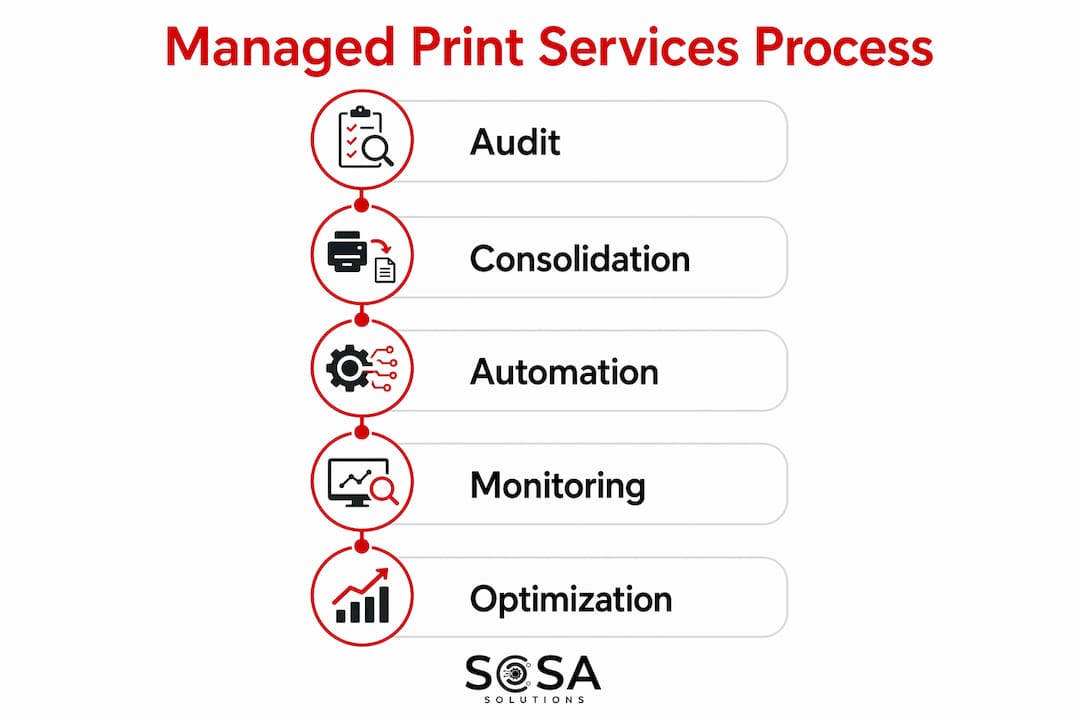
Print environment audit. The provider maps every device, measures usage, and identifies waste before a single change is made.
Fleet consolidation. Replacing desktop printers with fewer multifunction devices (MFDs) is the fastest way to cut per-page costs. Small desktop printers carry significantly higher per-page costs than centralized MFDs.
Service Level Agreement (SLA). A fixed monthly fee covers hardware, toner, paper, maintenance, and repairs. One invoice replaces a dozen vendor relationships.
Remote monitoring. Software agents track device status in real time, triggering automatic toner orders and flagging issues before they cause downtime.
Security controls. User authentication, PIN or badge release, and encrypted data transit protect sensitive documents at the device level.
Workflow integration. Cloud-based integrations and document digitization connect print output to broader business systems.
Pro Tip: Ask any MPS provider to show you a sample audit report before signing. If they cannot demonstrate what their assessment looks like, their monitoring capabilities are likely shallow.
How does managed print work to cut costs and improve efficiency?
MPS delivers savings through three mechanisms: fleet consolidation, automated supply management, and data analytics. Each one attacks a different category of waste.
Fleet consolidation is the most immediate lever. Decentralized desktop printers are expensive to maintain and nearly impossible to track. A quality initial audit reveals hidden costs embedded in those devices. Replacing them with shared MFDs drops per-page costs and reduces the number of devices IT must support.

IDC reports that organizations using MPS reduce printing costs by approximately 30% within the first year. Some businesses reach higher savings by adjusting default print settings and enforcing duplex printing policies. Paper usage drops by up to 50% in enterprise deployments where MPS programs are fully implemented.
The IT productivity gain is equally significant. MPS can reclaim up to 40% of IT help desk time by automating supply replenishment and remote maintenance. That time shifts from reactive printer troubleshooting to higher-value work.
Cost Category | Without MPS | With MPS |
Per-page cost (desktop printer) | High, variable | Reduced via MFD consolidation |
Toner management | Manual, reactive | Automated replenishment |
IT help desk time on printers | Up to 40% of tickets | Significantly reduced |
Total print spend | Untracked, growing | 20–40% reduction typical |
Vendor invoices | Multiple | Single monthly SLA fee |
“MPS is not just outsourced maintenance or toner delivery. It transforms document output into a measurable business asset with visibility and control.” — Landall
The shift from reactive break-fix IT to proactive remote monitoring is the real operational gain. Problems get resolved before they interrupt work.
What security and compliance benefits do managed print services provide?
Print security is a serious gap in most businesses. 68% of businesses have experienced a print-related data breach. Documents left unclaimed on printer trays, unencrypted data sent across networks, and shared devices with no access controls all create exposure.
MPS addresses these risks through a layered security model:
Secure pull-printing. The job sits in a queue until the user authenticates at the device with a PIN or badge. Nothing prints until the right person is standing there.
Encrypted data transit. Print jobs travel across the network in encrypted form, blocking interception.
Audit trails. Every print job is logged with user, time, device, and document type. This supports compliance with regulations like HIPAA and SOX.
Access controls. Administrators set rules by user, department, or device. Color printing, for example, can be restricted to roles that actually need it.
Pro Tip: Secure pull-printing adds a step to the print process. Communicate the reason to your team before rollout. Failing to get employee buy-in is the most common reason security features get disabled or ignored.
MPS also supports corporate sustainability goals. Centralized reporting shows paper and energy consumption by department. That data feeds directly into environmental reporting and waste reduction programs.
How does the MPS implementation process work?
Implementation follows a defined sequence. Knowing the steps helps you set realistic expectations and hold your provider accountable.
Initial audit. The provider inventories every printer, copier, and MFD in your environment. They measure page volumes, device age, supply costs, and downtime frequency. This audit is the foundation of everything that follows.
Environment design. Based on audit findings, the provider recommends a new device layout. This typically means fewer, better-placed MFDs replacing multiple desktop units.
SLA negotiation. The SLA is customized to your workflows, not pulled from a generic template. It specifies response times, included services, volume thresholds, and escalation procedures.
Deployment. New devices are installed, software agents are configured, and users are trained. A phased rollout reduces disruption.
Ongoing management. The provider monitors devices remotely, ships toner before you run out, and resolves issues proactively. Monthly reports show usage, costs, and performance against SLA targets.
Continuous optimization. Quarterly reviews identify new savings opportunities. Print policies get adjusted as your business changes.
The implementation process bundles hardware, supplies, monitoring, and repairs into one predictable payment. That predictability is valuable for budget planning. Surprises like emergency toner orders or unplanned repair bills disappear.
A common pitfall is skipping employee communication. Users who do not understand why workflows changed will work around new controls. Brief your team before deployment, not after.
How to choose the right managed print service provider
Not all MPS providers deliver the same depth of service. The difference between a strong program and a weak one usually shows up in the audit quality and the SLA structure.
Evaluate providers against these criteria:
Audit depth. A serious provider spends time on-site mapping your environment before proposing anything. A provider who quotes without auditing is guessing.
SLA customization. Tailored SLAs that reflect your specific workflows outperform generic service plans. Ask to see sample SLAs from similar clients.
Security capabilities. Confirm that secure pull-printing, encryption, and audit logging are included, not sold as add-ons.
Cloud and hybrid support. MPS programs that scale with remote and hybrid workforces use cloud-based print management tools. If your team works across locations, this is non-negotiable.
Local support. Remote monitoring handles most issues, but some problems require a technician on-site. Ask about average response times and technician coverage in your area.
Proven outcomes. Request documented cost savings from current clients, not marketing projections.
MPS is highly effective for mid-sized businesses, not only large enterprises. A provider who treats your 50-person company like a scaled-down enterprise account will deliver better results than one who offers you a stripped-down version of a Fortune 500 program. The benefits of outsourced IT support apply directly here: the right partner matches your scale, not just your budget.
Key takeaways
Managed print services reduces total print costs by 20–40%, reclaims IT time, and closes security gaps that most businesses do not realize they have.
Point | Details |
Cost reduction is immediate | MPS cuts total print spend by 20–40% in year one through fleet consolidation and automated supply management. |
IT time is recovered | Automating supply replenishment and remote maintenance reclaims up to 40% of IT help desk time. |
Security gaps get closed | 68% of businesses face print-related breaches; secure pull-printing and encryption address the core risks. |
Audit quality determines outcomes | A thorough initial audit reveals hidden costs and sets the foundation for a successful MPS program. |
SLA customization matters | Generic service plans underperform; SLAs tailored to your workflows deliver measurably better results. |
Why most businesses underestimate what MPS actually does
Most managers I talk to think managed print services means someone delivers toner and fixes jams. That framing undersells the program by a wide margin. The real value is visibility. Before MPS, most businesses have no idea what they spend on printing across all devices, departments, and locations. After a proper audit, that number becomes clear, and it is almost always higher than expected.
The shift from reactive to proactive management changes how IT operates. Your team stops fielding printer calls and starts working on things that actually move the business forward. I have seen this free up meaningful IT capacity in organizations with as few as 30 employees.
The security angle also gets underestimated. A document sitting on a shared printer tray for 20 minutes is a real compliance risk. Secure pull-printing solves that, but only if employees understand why it exists. The technology is straightforward. The change management is where programs succeed or fail.
One more thing: do not skip the sustainability reporting. If your business has any environmental commitments, MPS gives you the data to back them up. Paper consumption by department, energy use per device, and waste reduction over time are all trackable. That data has real value beyond the print room.
— Christopher
Managed print solutions from Sosasolutionsnyc in NY and FL
Sosasolutionsnyc works with businesses across New York and Florida to implement managed print solutions that fit their actual workflows, not generic templates. The approach starts with a detailed audit of your current print environment, then builds a fixed-fee SLA covering hardware, supplies, maintenance, and security.
Every client gets one invoice, one point of contact, and proactive monitoring that catches problems before they interrupt operations. Sosasolutionsnyc’s managed IT services bundle print management with broader IT support, so your print environment connects to the rest of your technology strategy. If you are opening a new location, the team also handles print infrastructure setup as part of a complete store launch. Contact Sosasolutionsnyc to schedule an initial print audit and get a clear picture of what you are actually spending.
FAQ
What is managed print services in simple terms?
Managed print services means an outside provider takes over full management of your printers, copiers, and document workflows. They handle supplies, maintenance, security, and reporting under a fixed monthly fee.
How much can managed print services save my business?
Organizations typically reduce total printing costs by 20–40% in the first year. Toner savings alone average 40%, and paper usage drops by up to 50% in fully implemented programs.
What do managed print services include?
A full MPS program includes a print environment audit, fleet consolidation, remote monitoring, automatic supply replenishment, security controls like secure pull-printing, and a customized SLA covering all hardware and maintenance costs.
Are managed print services only for large companies?
MPS is effective for mid-sized businesses, not only large enterprises. Providers who customize SLAs to your specific workflows deliver strong results regardless of company size.
How does secure pull-printing work?
Secure pull-printing holds a print job in a queue until the user authenticates at the device using a PIN or badge. The document only prints when the right person is physically present at the machine.
Recommended
Comments