How to Upgrade Retail Store Technology in 2026
Outdated point-of-sale systems, disconnected inventory tools, and checkout friction are costing retail businesses real money right now. When you upgrade retail store technology, you close the gap between what customers expect and what your store actually delivers. The pressure is measurable: unified commerce leaders grow nearly 2X faster than retailers who stand still. This guide walks you through every phase of a smart technology upgrade, from assessing what you have today to measuring results after rollout.
Table of Contents
Key takeaways
Point | Details |
Audit before you upgrade | Map every tool in your current stack before spending a dollar on new technology. |
Prioritize unified platforms | Consolidating POS, inventory, and checkout onto one system reduces errors and speeds up operations. |
Budget for total cost | Hardware prices are only part of the cost. Factor in installation, software, monitoring, and ongoing support. |
Plan a phased rollout | Test upgrades in one location or channel before expanding to reduce disruption and catch issues early. |
Measure results with KPIs | Track checkout time, inventory accuracy, and customer satisfaction to confirm your upgrades are working. |
How to upgrade retail store technology the right way
Before you buy a single piece of hardware or sign a software contract, you need a clear picture of what you already have. This stage is called a technology audit, and skipping it is the most common reason retail upgrades fail or go over budget.
Start by listing every component of your current stack:
POS terminals: How old is the hardware? Does the software still receive security updates?
Inventory management: Is it real-time or batch-updated? Does it sync with your online store?
Checkout tools: Are there self-checkout units? Are they integrated with your POS?
Customer engagement: Loyalty programs, email platforms, and CRM systems. Are they connected or siloed?
Analytics and reporting: Can you pull sales and inventory data in one place, or do you log into three different dashboards?
Write down where data breaks down. If your warehouse inventory does not match what your POS shows on the floor, that is a disconnected data problem. If staff waste 20 minutes each morning reconciling numbers from two separate systems, that is a workflow problem driven by fragmented tech.
After mapping the current state, define your upgrade goals in business terms, not tech terms. “Reduce average checkout time by 30%” is a goal. “Get a new POS” is a purchase. Goals shape better decisions.
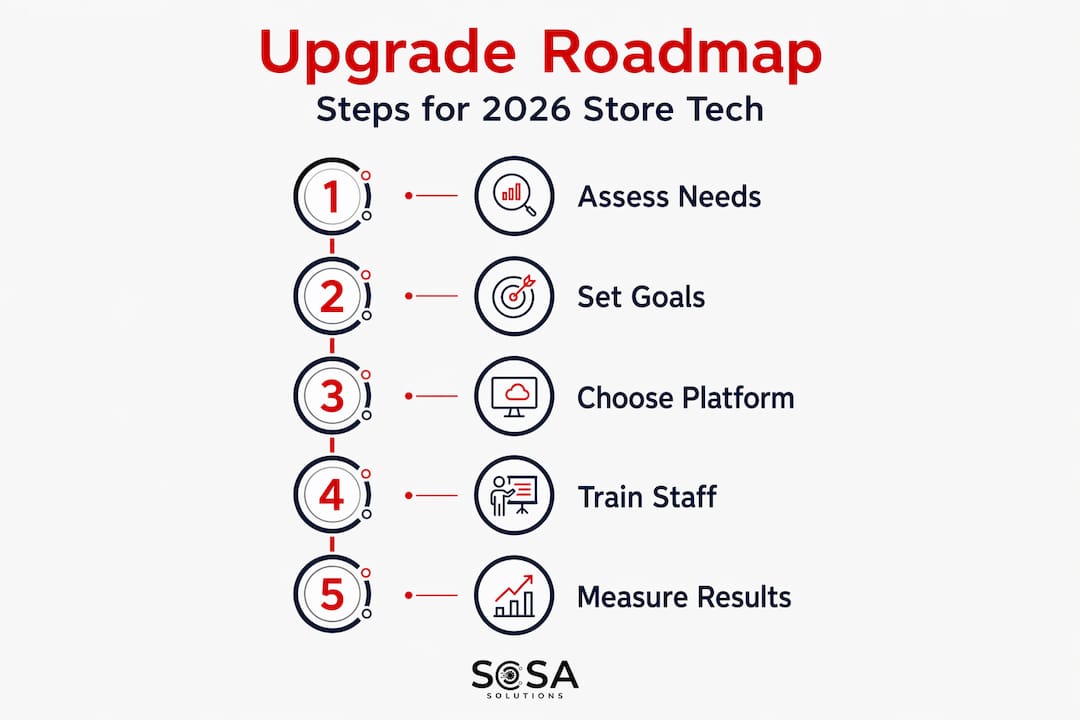
Pro Tip: Talk to your front-line staff before defining goals. Cashiers, floor associates, and stock room workers know exactly where the friction is. Their input often reveals bottlenecks that management-level reports miss entirely.
Top retail technology solutions to consider in 2026
The phrase “digital transformation” gets used loosely, but for most retail store managers, it really means one thing: replacing disconnected tools with systems that work together. Here is where the biggest opportunities sit in 2026.
Unified commerce platforms
Shopify emphasizes moving storefront, POS, and checkout tools onto a single platform for centralized management. The benefit is immediate. Fewer systems mean fewer points of failure, less manual reconciliation, and faster access to accurate data. Reducing tool sprawl not only cuts costs but accelerates operational stability across your entire store network.
Modern POS with omnichannel support
Cloud-native POS systems now support BOPIS and BORIS (buy online, pick up in store and buy online, return in store) as standard features. That matters because customers do not separate their online and in-store experiences anymore. Your systems need to reflect that reality.
Technology | Primary Benefit | Best For |
Unified commerce platform | Centralizes POS, inventory, and checkout | Multi-location retailers |
Cloud-native POS | Real-time inventory and omnichannel fulfillment | Growing mid-size stores |
AI smart carts | Faster checkout, reduced labor | High-volume grocery and convenience |
Hybrid self-checkout | Customer independence with staff backup | All store formats |
Legacy integration layer | Real-time inventory without replatforming | Stores with existing ERP systems |
AI-powered in-store tools
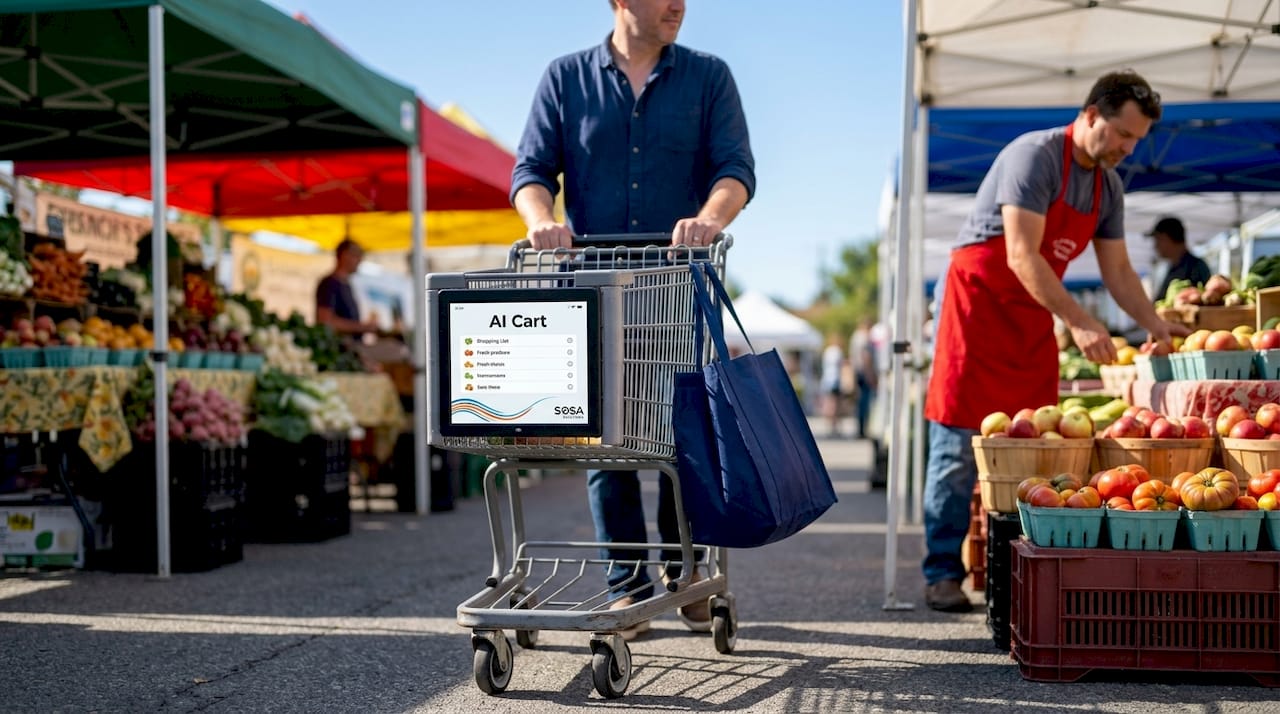
AI smart carts reduce checkout time to as little as 36 seconds and save significant employee hours through automation. FairPrice Group deployed these across 48 stores by 2026. The efficiency gains are real, but the larger story is that AI in retail extends well beyond customer-facing tools. It includes workforce scheduling, demand forecasting, and dynamic pricing.
Hybrid self-checkout systems
Scotmid Co-op completed a full assisted checkout rollout combining customer-operated units with staff-facing support screens. The result is faster throughput without abandoning the human element entirely. This model works particularly well in stores where customers skew toward older demographics or where product complexity requires occasional staff guidance.
Legacy system integration
Not every retailer needs to rip and replace their backend. A connectivity-first approach lets you modernize experience layers without replacing core inventory or ERP systems. OnQ’s integration with IBM AS/400 proves this works at scale: real-time inventory visibility in-store, with no wholesale backend replacement required.
Pro Tip: If you are running a legacy inventory system that still works well, prioritize integration over replacement. A modern API layer connecting your existing backend to a new customer-facing platform often costs a fraction of a full replatform and gets you live faster.
Step-by-step plan to execute your upgrade
A tech upgrade without a structured rollout plan creates more problems than it solves. Here is a practical sequence that retail businesses of any size can follow.
Clean your data first. Before connecting any new system, standardize your product catalog, SKU structure, and customer data. Garbage data flowing into a new platform stays garbage.
Select your unified commerce platform. Evaluate options based on your business size, number of locations, and whether you need online-to-offline integration. Prioritize platforms that are cloud-native and API-first.
Plan your rollout in phases. Start with one store or one channel. Validate that workflows operate correctly before expanding. This limits the blast radius if something breaks.
Build your full budget. Self-checkout units range from about $3,000 to $40,000 each, and operational costs over the product lifecycle frequently exceed the hardware purchase price.
Train staff in parallel. Run new systems alongside old ones during a transition window so staff can learn without disrupting customers.
Execute staged testing. A disciplined change-control process with early testing protocols is one of the most effective ways to limit cost overruns during multi-location rollouts.
Go live and monitor actively. Set dashboard alerts for checkout errors, inventory sync failures, and payment processing delays during the first 30 days.
Rollout Phase | Key Activity | Goal |
Pre-launch | Data cleanup and system audit | Accurate baseline for new systems |
Pilot | Single location or channel test | Validate workflows and identify gaps |
Expansion | Staged rollout across locations | Minimize risk, apply lessons from pilot |
Stabilization | Staff training and performance monitoring | Ensure consistent daily operations |
Common challenges when upgrading store tech
Even well-planned upgrades hit friction. The issues below come up repeatedly, and knowing them in advance gives you a meaningful advantage.
Multiple data sources causing sync errors. Unified fulfillment failures most often trace back to duplicate inventory or order data. Design your POS workflows around a single real-time source of truth from day one.
Underestimated lifecycle costs. The hardware invoice is what retailers see. What catches them off guard is the total cost: software subscriptions, remote monitoring, spare parts, and technician visits. Standardizing station configurations across locations is one of the best ways to control these ongoing expenses.
Staff resistance to new workflows. Technology adoption stalls when staff feel like the change was done to them rather than with them. Involve department leads in the selection process. Give them ownership over the transition.
Customer experience dips during transition. Expect some friction during cutover. Communicate proactively with customers if checkout flows change. Brief, visible signage works better than nothing.
IT support gaps post-launch. New systems need ongoing monitoring. Many retailers sign contracts for technology and then discover they have no internal resource to manage it day-to-day. Partnering with a dedicated retail IT support provider fills this gap before it becomes a crisis.
Pro Tip: Assign a single internal point of contact for your upgrade project. This person does not need to be technical. They need to be organized, communicate clearly with vendors, and escalate issues fast. Upgrades without an owner drift and go over budget.
How to measure success after your upgrade
Spending money on modern retail systems without measuring outcomes is a missed opportunity. Here is what to track once your new tech is live.
Checkout time: Measure average transaction duration before and after. Even a 20% reduction translates directly into higher throughput and fewer abandoned purchases.
Inventory accuracy: Compare physical counts to system records monthly. A unified platform should bring this number above 98%.
Labor cost per transaction: As automation takes on repetitive tasks, this figure should trend down over time.
Customer satisfaction scores: Surveys, reviews, and Net Promoter Score data give you signal on whether the experience improvements are landing with shoppers.
Loyalty program engagement: If your upgrade included CRM integration, track enrollment rates and repeat purchase frequency. These numbers reveal whether your customer data is actually working for you.
Sales growth vs. prior period: Compare like-for-like periods across locations. Stores that upgraded should show measurable improvement relative to those that have not.
Build a simple monthly reporting cadence around these six metrics. Most unified commerce platforms include dashboards that surface this data automatically.
My honest take on where most retailers go wrong
I have watched retailers pour serious budget into tech upgrades and walk away disappointed. The pattern is almost always the same. They buy the technology and skip the strategy.
The mistake I see most often is treating an upgrade as a series of individual purchases rather than a connected system redesign. A retailer replaces their POS, keeps their old inventory tool, and then wonders why reconciliation problems persist. Nothing changed at the architecture level. The unified commerce benchmark finding that only 7% of specialty retailers have achieved true unified commerce maturity does not surprise me at all. Most retailers buy point solutions when they need platform thinking.
The other thing I tell every retail manager I work with: do not confuse the latest tech with the right tech. Smart carts are genuinely impressive. But if your staff turnover is high and your inventory data is unreliable, smart carts are a distraction from the foundational problems. Fix the data. Fix the workflows. Then layer on the innovation.
And finally, the retailers I see win long-term are not the ones who upgraded the most aggressively. They are the ones who partnered with an IT team that understood their specific context and stayed engaged after launch. The benefits of unified IT service providers for retailers go well beyond installation day. The ongoing relationship is where the real value compounds.
— Christopher
Ready to modernize your store’s technology?
If you are a retail business owner in New York or Florida, Sosasolutionsnyc works directly with stores at every stage of a technology upgrade, from initial infrastructure assessment to hands-on rollout support and day-to-day managed IT services.
The team at Sosasolutionsnyc handles the technical complexity so you can focus on running your store. Whether you need help planning a phased rollout, integrating a new POS with legacy systems, or keeping everything running after go-live, their retail IT support services are built specifically for the retail environment. They also offer managed IT services designed to keep your store’s technology performing at full capacity every single day. Reach out to Sosasolutionsnyc and get a consultation tailored to your store’s specific setup.
FAQ
What does it mean to upgrade retail store technology?
Upgrading retail store technology means replacing or integrating outdated hardware and software with modern systems that improve checkout speed, inventory accuracy, and customer experience. This typically includes POS systems, inventory management tools, and customer engagement platforms.
How much does a retail technology upgrade cost?
Costs vary widely depending on the scope. Self-checkout units alone range from $3,000 to $40,000 per unit, and total lifecycle costs including software, monitoring, and support often exceed the initial hardware price.
How long does a retail tech upgrade take?
A phased rollout for a single location typically takes four to twelve weeks depending on system complexity. Multi-location upgrades can run six to eighteen months when executed in controlled stages.
What is unified commerce and why does it matter?
Unified commerce is the practice of consolidating POS, inventory, checkout, and customer data onto a single platform. Retailers who achieve this maturity grow nearly twice as fast as those who rely on disconnected systems.
Do I need to replace my legacy systems entirely?
Not necessarily. A connectivity-first approach can connect your existing backend, like an ERP or warehouse system, to modern customer-facing platforms using real-time integration layers, avoiding the cost and disruption of a full replatform.
Recommended


Comments