Retail IT Helpdesk Workflow Setup for Managers

A retail IT helpdesk workflow setup is a structured system of ticket intake, triage, routing, escalation, and resolution designed specifically for retail environments to maximize uptime and operational efficiency. In the industry, this is formally called an IT service desk workflow, and the distinction matters: service desk implies a broader, process-driven function rather than a reactive break-fix model. Standardized helpdesk workflows deliver up to 40% faster issue resolution and 25% higher customer satisfaction compared to manual processes. That gap is the difference between a store that recovers from a POS failure in 20 minutes and one that loses two hours of revenue. Platforms like Zendesk, Freshservice, and ServiceNow are the most widely deployed tools for building these workflows in retail, and AI-driven automation is rapidly changing what L1 support can handle without human intervention.
What are the essential components of a retail IT helpdesk workflow setup?
Every effective IT support workflow for retail is built on a tiered support model. The three tiers define who handles what, at what speed, and when to escalate. Without this structure, tickets pile up at the wrong level and resolution times collapse.
L1 (Tier 1) covers frontline issues: password resets, POS login errors, receipt printer jams, and basic network connectivity. L1 agents work from scripts and knowledge base articles, targeting first-contact resolution within one to four hours for standard requests. L2 (Tier 2) handles issues that require deeper system access, such as software configuration errors, network switch failures, or inventory system sync problems. L2 targets resolution within eight hours for high-priority tickets. L3 (Tier 3) is reserved for vendor escalations, infrastructure failures, and problems requiring engineering-level expertise, with 6-hour turnaround for urgent changes per 2026 retail IT standards.
Ticket prioritization follows a P1 through P4 scale:
P1 (Critical): Full store outage, all POS terminals down. Target response: 15 minutes.
P2 (High): Partial POS failure, payment processing errors. Target response: 1 hour.
P3 (Medium): Single workstation issue, slow network. Target response: 4 hours.
P4 (Low): Cosmetic software bugs, non-urgent hardware requests. Target response: next business day.
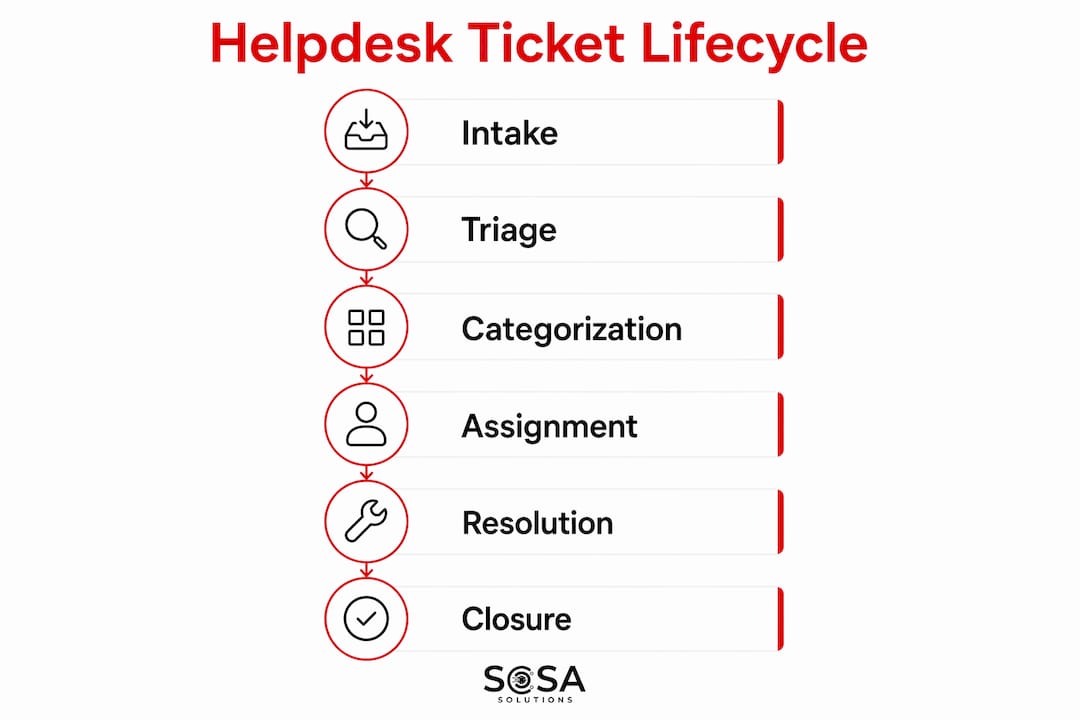
The full ticket lifecycle moves through five stages: intake, triage, categorization, assignment, resolution, and closure. Each stage needs a defined owner and a time limit. Without ownership, tickets stall between triage and assignment, which is where most retail IT backlogs originate.
Tier | Scope | Target Resolution |
L1 | Password resets, basic POS errors, printer issues | 1 to 4 hours |
L2 | Network config, software faults, sync errors | 4 to 8 hours |
L3 | Infrastructure failures, vendor escalations | Same day or 6-hour urgent |
For a deeper look at how support tiers function in retail environments, the classification differences between support types matter as much as the tier definitions themselves.
How can AI and automation transform retail IT helpdesk workflows?
AI-driven automation is the single biggest lever available to retail IT managers in 2026. The numbers are concrete: AI-powered service desks achieve 68% L1 auto-resolution rates and 73% faster ticket resolution. For a retailer running 50 stores, that means hundreds of tickets per week resolved without a human agent touching them.
The capabilities break down into three layers:
Classification and routing: AI reads incoming ticket text and assigns category, priority, and tier automatically. This eliminates the manual triage bottleneck that slows most retail helpdesks.
Autonomous resolution: AI agents handle defined issue types end-to-end, such as account unlocks, scheduled reboots, or standard software reinstalls, without agent involvement.
Predictive alerting: AI monitors device health data and flags POS terminals or network hardware likely to fail before they do, shifting the model from reactive to proactive.
The correct deployment sequence matters. Phased AI implementation starts with classification and routing, then moves to assisted resolution, and only then to full autonomous handling. Skipping phases creates governance gaps that are expensive to fix post-launch.
Confidence thresholds and human oversight checkpoints are not optional features. They are the mechanism that prevents an AI agent from autonomously acting on a misclassified P1 ticket. Define the threshold at which the system escalates to a human before you go live, not after the first incident.
Pro Tip: Set your AI confidence threshold at 85% or higher for autonomous resolution actions. Any ticket the model scores below that threshold should route to an L1 agent for review. This single control prevents the majority of AI-driven misroutes in retail environments.
Automation alone does not fix poor process design. Organizations need mature workflows and human checks for scalable success. AI accelerates a good process. It amplifies a broken one.
What role does remote support and integrated technology play in retail IT efficiency?
Remote support in retail is an ecosystem, not a software tool. The distinction is critical for IT managers who assume that deploying a remote desktop application solves their support coverage problem. Effective remote support requires unified visibility into POS systems, handheld devices, and network infrastructure to enable diagnosis without guesswork or redundant travel.
The foundation is network visibility. A technician who cannot see the state of the store’s Wi-Fi access points, WAN connection, and cloud-connected systems before attempting remote resolution is working blind. Tools like SolarWinds, Auvik, and Meraki Dashboard provide the real-time network telemetry that makes remote diagnosis accurate. Without that layer, remote support devolves into phone-guided troubleshooting, which is slow and error-prone.
Integrated helpdesk platforms close the loop between ticket management and device management. When Freshservice or Zendesk is connected to a mobile device management (MDM) platform like Jamf or Microsoft Intune, agents see device health, software version, and recent error logs directly inside the ticket. That context cuts average handle time significantly.
“A well-designed retail IT helpdesk integrates processes and human factors with technology to reduce friction, not just automate tasks.” — TMC Insight on remote support
Consider a practical scenario: a store manager in Manhattan reports that two of five POS terminals are offline. With integrated remote support, the L1 agent sees network telemetry showing a VLAN misconfiguration, pulls the device logs, and resolves the issue remotely in 18 minutes. Without integration, the same ticket requires an on-site visit, costing three to four hours of store disruption. For more on remote support essentials in retail, the practical setup decisions differ significantly from general IT environments.
How to optimize and sustain your retail IT helpdesk workflows using data
A slow service desk is a process problem, not a people problem. Frameworks like ITIL and Six Sigma identify bottlenecks and convert support into a measurable, improvable process. Retail IT managers who treat helpdesk performance as a staffing issue consistently underperform those who treat it as an operations problem.
The core metrics to track are:
First Contact Resolution (FCR): Percentage of tickets resolved at L1 without escalation. Industry target: 70% or higher.
Mean Time to Resolution (MTTR): Average time from ticket open to close, segmented by priority level.
Backlog aging: Number of tickets open beyond their SLA window, reviewed weekly.
SLA compliance rate: Percentage of tickets resolved within defined response and resolution targets.
Six Sigma’s DMAIC framework (Define, Measure, Analyze, Improve, Control) applies directly to helpdesk optimization. Data-driven help desks using Six Sigma improve resolution time, customer satisfaction, and consistency by applying control plans that prevent process drift after improvements are made. The “Control” phase is where most retail IT teams fail. They improve a metric, declare success, and stop monitoring. Six weeks later the metric regresses.
Knowledge base management is the other underinvested area. Every recurring ticket type that L1 resolves should have a documented resolution article. Service desk SOPs treated as living documents with short, action-oriented procedures deliver better training outcomes and consistent process adherence, which matters enormously in retail IT where staff turnover is high.
Pro Tip: Run a monthly ticket audit on your top 10 recurring issue types. If any of them lack a knowledge base article, create one before the next cycle. This single habit reduces average L1 handle time faster than any software upgrade.
Optimization method | Best applied to | Expected outcome |
ITIL incident management | Ticket categorization and SLA tracking | Reduced backlog, clearer accountability |
Six Sigma DMAIC | Root cause analysis on repeat failures | Permanent fix vs. temporary workaround |
Living SOP management | L1 training and knowledge base updates | Faster onboarding, lower error rates |
Hybrid outsourcing with SLAs | After-hours and overflow coverage | Cost control with quality accountability |
Hybrid outsourcing models keep in-house leadership with clear SLA controls, balancing cost and performance without sacrificing accountability. For retail IT managers in multi-location environments, this model is often more practical than building full in-house coverage for every shift.
Key takeaways
A retail IT helpdesk workflow setup succeeds when tiered support structures, AI-driven automation, integrated remote visibility, and data-driven optimization frameworks operate together as a single system.
Point | Details |
Tiered support is non-negotiable | Define L1, L2, and L3 responsibilities with SLA targets before deploying any tooling. |
AI starts with classification | Deploy AI for routing and classification first; autonomous resolution comes after governance controls are in place. |
Remote support needs network visibility | Integrate network monitoring tools with your helpdesk platform to enable accurate remote diagnosis. |
Optimization requires process frameworks | Apply ITIL or Six Sigma DMAIC to turn performance data into permanent improvements, not one-time fixes. |
SOPs must stay current | Treat service desk documentation as a living resource updated with agent feedback after every major incident. |
What I’ve learned building retail IT helpdesks that actually scale
I’ve worked with retail IT environments ranging from single-location boutiques to multi-state chains, and the pattern that separates functional helpdesks from struggling ones is almost never the software. It’s the absence of a defined escalation path that anyone actually follows.
The most common mistake I see is deploying a platform like Freshservice or Zendesk, configuring basic ticket categories, and calling it a workflow. A ticket category is not a workflow. A workflow is a documented sequence of decisions with named owners, time limits, and escalation triggers. Without that, the platform becomes an expensive inbox.
The second mistake is treating AI automation as a shortcut around process maturity. I’ve seen retail IT teams implement AI classification on a helpdesk where L1 agents were still resolving tickets by email thread. The AI routed tickets perfectly into a process that was still broken. The response time discipline has to exist before automation adds value.
What actually works is starting with three things: a written tier structure, a P1 through P4 priority matrix, and a weekly SLA review. Get those stable first. Then layer in automation, starting with classification. Then integrate remote monitoring. Then optimize with data. Retail IT helpdesks that try to do all of this simultaneously usually end up with none of it working well.
The teams that scale successfully also treat their SOPs as operational assets, not compliance documents. They update them after incidents, simplify them when agents flag confusion, and review them quarterly. High staff turnover in retail makes this non-negotiable. A new L1 agent who can follow a clear, current SOP is more valuable than an experienced one working from memory.
— Christopher
How Sosasolutionsnyc helps retail businesses build better IT helpdesks
Sosasolutionsnyc specializes in managed IT services for retail businesses across New York and Florida, with direct experience in helpdesk workflow setup, remote support integration, and AI-driven ticket automation. Whether you are opening a new store location or restructuring an existing IT support operation, Sosasolutionsnyc builds the tier structures, SLA frameworks, and technology integrations that make your helpdesk perform consistently. If you are ready to move from reactive firefighting to a measurable, scalable IT support operation, contact Sosasolutionsnyc for a consultation tailored to your retail environment. For new store launches, their store opening IT solutions include full helpdesk workflow setup from day one.
FAQ
What is a retail IT helpdesk workflow?
A retail IT helpdesk workflow is a structured process covering ticket intake, triage, prioritization, escalation, and resolution tailored to retail operations. It defines who handles each issue type, at what speed, and under what conditions a ticket moves to a higher support tier.
How many support tiers does a retail IT helpdesk need?
Most retail IT helpdesks operate on three tiers: L1 for frontline issues like POS errors and password resets, L2 for network and software faults, and L3 for infrastructure failures and vendor escalations. Each tier requires defined response windows and escalation triggers to function correctly.
What metrics should I track for helpdesk process optimization?
Track First Contact Resolution rate, Mean Time to Resolution by priority level, SLA compliance rate, and backlog aging. Six Sigma and ITIL frameworks provide the analytical structure to turn these metrics into permanent process improvements.
When should AI automation be added to a retail IT helpdesk?
Add AI automation after your tier structure, SLA targets, and escalation paths are documented and stable. Start with classification and routing, define confidence thresholds before launch, and expand to autonomous resolution only after the classification layer performs reliably.
How does remote support reduce POS downtime in retail?
Remote support reduces POS downtime by giving technicians real-time visibility into network state, device health, and error logs before they attempt resolution. Unified remote visibility across POS systems, handheld devices, and network infrastructure eliminates the guesswork that turns 20-minute fixes into multi-hour on-site visits.
Recommended


Comments