Corporate IT Service Desk Setup: A Practical Guide

A corporate IT service desk setup is the centralized system, team, and process responsible for managing every IT incident and service request employees generate across your organization. For retail and SME IT managers, getting this structure right determines whether your stores stay operational during peak hours or grind to a halt over a printer failure. The industry standard term is IT service management (ITSM), and frameworks like ITIL provide the operational backbone most modern desks run on. This guide covers the core components, a step-by-step implementation path, performance metrics, and the most common pitfalls you will face when building or overhauling your support operation.
What is a corporate IT service desk setup?
A corporate IT service desk is defined as the single point of contact (SPOC) between IT staff and end users for all incidents, service requests, and communications. This is not the same as a basic help desk, which typically handles only break-fix issues. A full service desk manages the entire ticket lifecycle, tracks SLA compliance, maintains a knowledge base, and feeds data back into continuous improvement cycles.
For retail and SME environments specifically, the service desk carries extra weight. A point-of-sale system going down at a Manhattan store during a Saturday rush is a revenue event, not just a technical inconvenience. The service desk is the function that absorbs that pressure and routes it to resolution before it compounds.
Modern service desks also integrate AI-assisted triage and ITIL-aligned workflows. ITIL 5 emphasizes an omnichannel, value-based approach to ticket handling, prioritizing business impact and user experience over simple queue order. That shift matters for retail IT managers who need to differentiate a store-down emergency from a routine password reset automatically.
Essential components of an effective IT service desk
Tiered support structure
A functional service desk organizes staff into three tiers. Tier 1 handles first contact, password resets, basic troubleshooting, and ticket intake. Tier 2 manages more complex issues requiring deeper system knowledge, such as network configuration or application errors. Tier 3 escalates to vendors, developers, or senior engineers for problems beyond internal capability. Clear tier definitions prevent the most common structural failure: Tier 2 engineers fielding calls that Tier 1 should resolve, which wastes expensive resources and slows everything else down.

Ticket lifecycle and intake channels
An ITIL-aligned ticket lifecycle moves through intake, triage and prioritization, categorization and routing, troubleshooting or fulfillment, SLA monitoring, escalation, knowledge base creation, and closure with a post-incident review. Each stage has defined ownership and time targets. Centralizing intake through a self-service portal, email, or phone prevents the shadow IT problem where employees text a technician directly and the issue never enters the system.
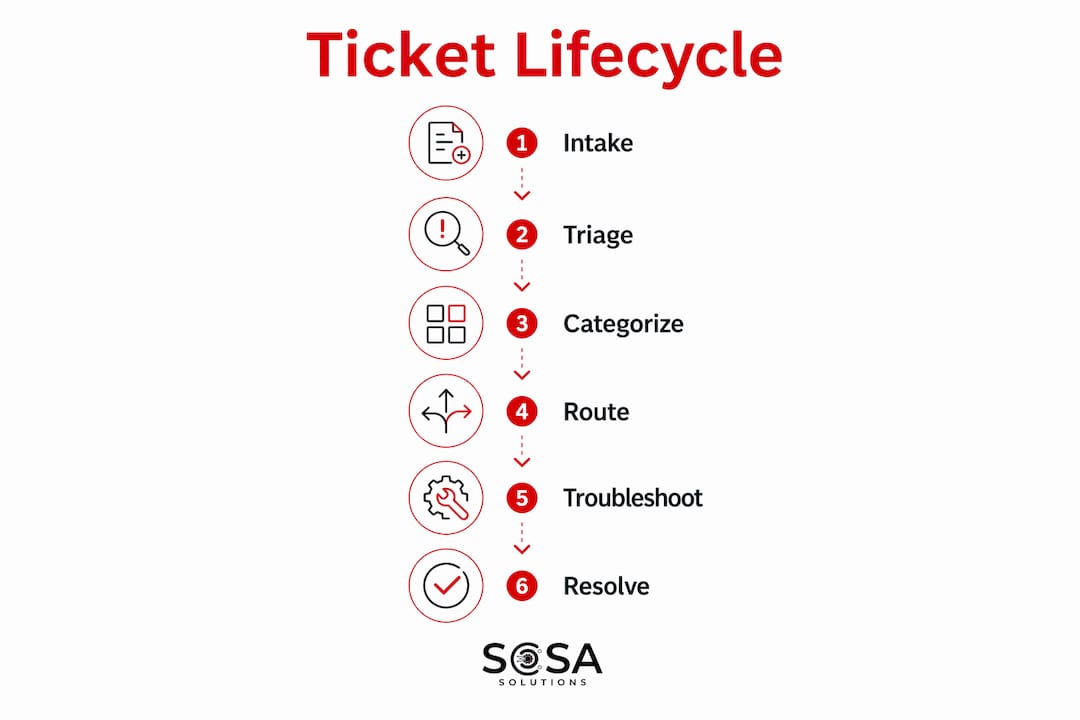
Pro Tip: Lock your intake channels before anything else. If users can bypass the portal by calling a technician’s cell phone, your ticket data will be incomplete and your SLA reports will be meaningless.
Service desk model comparison
Different organizational structures suit different business sizes and geographic footprints. The table below compares the three primary models:
Model | Best for | Key advantage | Main limitation |
Centralized | Single-location SMEs | Consistent processes, lower cost | No local presence for on-site needs |
Virtual | Multi-location retail chains | Flexible staffing, remote-first | Requires strong remote tooling |
Follow-the-sun | Global or multi-timezone operations | 24/7 coverage without overtime | High coordination overhead |
For most retail SMEs operating across New York and Florida, a virtual model with defined on-site escalation paths covers the majority of scenarios without the overhead of a follow-the-sun operation.
Core tooling requirements
Every service desk needs four categories of tools: a ticketing system (ServiceNow, Jira Service Management, or Freshservice), a knowledge base platform, SLA monitoring dashboards, and a communication layer such as Microsoft Teams or Slack for internal escalation. Choosing tools that integrate natively reduces manual handoffs and keeps ticket data in one place. You can read more about retail IT support structures to understand how these tools map to different store environments.
How to set up your corporate IT service desk
A structured implementation prevents the most expensive mistake in ITSM projects: building too much at once and adopting nothing well. Follow these steps in sequence:
Define business goals and scope. Identify which locations, user groups, and ticket categories the desk will cover from day one. Retail IT managers should map store hours, peak traffic windows, and critical systems like POS and inventory management before writing a single SLA.
Select your ITSM platform. Match the tool to your team size and budget. Freshservice and Jira Service Management work well for SMEs. ServiceNow is the enterprise standard but carries significant configuration overhead for smaller teams.
Design ticket workflows. Map triage rules that assign category, priority, and routing automatically based on ticket attributes. A ticket tagged “POS system down” at a retail location should auto-route to Tier 2 with a Severity 1 SLA applied, not sit in a general queue.
Write and publish SLAs. SLAs should define measurable response and resolution targets by severity level. A Severity 1 incident, such as a store-wide outage, typically requires a response within 15 minutes. Document escalation triggers so technicians know exactly when to move a ticket up.
Assign roles and staff tiers. Define who owns Tier 1 intake, who handles Tier 2 escalations, and which vendors or internal engineers cover Tier 3. For lean SME teams, one person may cover multiple tiers, but the role definitions still need to exist in writing.
Build the knowledge base. Populate it with the 20 most common ticket types before go-live. Knowledge base articles linked to workflows boost First Contact Resolution rates and reduce repeat tickets. The articles are only useful if they are embedded in the triage process, not buried in a folder no one opens.
Configure self-service and automation. A self-service portal for password resets, software requests, and common how-to queries deflects a significant volume of Tier 1 tickets. AI-assisted categorization in tools like Freshservice or ServiceNow can auto-tag and route tickets before a human touches them.
Train staff and communicate to users. End-user adoption drives ROI for IT service desks. Without convenient portals and training, users bypass official channels, which inflates costs and corrupts your data. Run a short onboarding session for all staff before launch and post clear instructions at every intake channel.
Launch with a staged rollout. A staged rollout approach locks core incident management and SLA capabilities before adding problem management and change management modules. This reduces complexity and improves adoption speed. Start with one location or department, measure for 30 days, then expand.
Pro Tip: Resist the pressure to go live with every feature active. A desk running incident management and SLAs cleanly is worth more than a desk with change management, problem management, and asset tracking configured poorly.
The table below summarizes the tooling requirements at each setup phase:
Setup phase | Required tool category | Example tools |
Intake and ticketing | ITSM platform | Freshservice, Jira Service Management, ServiceNow |
Knowledge management | Knowledge base | Confluence, built-in ITSM KB modules |
SLA tracking | Monitoring dashboard | Built-in ITSM reporting, Power BI |
Communication and escalation | Collaboration platform | Microsoft Teams, Slack |
What KPIs should you track for IT service desk performance?
Performance management separates a service desk that improves over time from one that simply processes tickets. Four metrics form the core of any IT service desk measurement framework:
First Contact Resolution (FCR): The percentage of tickets resolved at Tier 1 without escalation. High FCR indicates well-enabled front-line teams and effective routing. Low FCR signals a need to improve staffing knowledge or routing rules, not just push for faster resolution times.
Mean Time to Resolution (MTTR): The average time from ticket creation to closure. Segment MTTR by ticket priority and category to identify where bottlenecks actually live. A high MTTR for Severity 1 tickets at retail locations is a different problem than a high MTTR for software installation requests.
SLA compliance rate: The percentage of tickets resolved within the defined SLA window. Track this by severity level, not as a single aggregate number. An overall 90% compliance rate can mask a 60% compliance rate on your most critical incidents.
Customer satisfaction (CSAT) scores: Collected via post-ticket surveys, CSAT scores reveal whether resolution quality matches resolution speed. A ticket closed in 10 minutes with the wrong fix scores worse than one closed in 2 hours with the right one.
Segmenting KPIs by priority and category transforms raw numbers into decisions. Build a dashboard that shows these four metrics filtered by location, ticket type, and technician tier. For retail IT managers covering multiple stores, location-level SLA compliance data is the single most useful view you can have. You can also reference IT support response time analysis to understand how response benchmarks translate to retail-specific outcomes.
Common challenges in IT service desk implementation
Ticket overload and tiering chaos are the most frequent failure modes in new service desk setups. Without explicit triage rules, every ticket lands in a general queue and Tier 2 engineers spend their day doing password resets. Avoiding tiering chaos requires mapping ticket category and priority to specific next actions, including auto-routing, required data collection, and defined escalation timing. This is a configuration task, not a staffing task.
Inaccurate categorization corrupts your reporting and makes escalation unpredictable. Require technicians to select from a controlled category list rather than free-text descriptions. Audit categorization accuracy monthly in the first quarter after launch.
Knowledge base neglect is the silent killer of FCR rates. Teams create articles at launch and never update them. Embedding knowledge base creation into the ticket resolution workflow, specifically as a required step before closing repeat issues, keeps the base current without a separate governance program.
User adoption failures are almost always a communication problem, not a technology problem. If employees do not know the portal exists or find it slower than texting a technician, they will bypass it. Announce the desk through every available channel, make the portal the path of least resistance, and measure bypass rates in the first 60 days.
The most expensive service desk is one that works perfectly but nobody uses. Adoption is not a soft goal. It is the metric that determines whether every other investment in the desk pays off.
For retail environments specifically, the IT incident response process for store-level issues requires extra attention during setup. Store staff are not IT professionals, and the intake process needs to be simple enough for a cashier to use under pressure.
Key takeaways
A corporate IT service desk setup succeeds when it combines a defined SPOC structure, ITIL-aligned workflows, staged rollout discipline, and KPIs segmented by priority and location.
Point | Details |
SPOC structure is non-negotiable | Centralize all intake channels before configuring any other feature to protect data integrity. |
Stage your rollout | Lock incident management and SLAs before adding problem and change management modules. |
FCR is your leading indicator | Low First Contact Resolution points to routing or knowledge gaps, not just staffing shortages. |
SLAs need severity tiers | Define response and resolution targets by severity level, not as a single aggregate target. |
Adoption determines ROI | User bypass of official channels invalidates ticket data and inflates support costs. |
What I’ve learned setting up service desks for retail and SME clients
Most IT managers I work with underestimate how much of a service desk setup is a change management project rather than a technology project. The ticketing platform is rarely the problem. The problem is that a store manager in Florida has been texting the same technician for three years and sees no reason to log a ticket instead. That behavior does not change because you deployed ServiceNow. It changes because you made the portal faster and easier than the text message, and then you measured compliance.
The second thing I consistently see underweighted is the knowledge base. Teams treat it as a documentation project to complete at launch and then ignore. The desks that sustain high FCR rates are the ones where closing a repeat ticket requires the technician to either link an existing article or create a new one. That single workflow rule does more for long-term performance than any AI feature.
On the automation side, I would caution against over-investing in AI triage before your categorization taxonomy is clean. AI-assisted routing is only as good as the categories it routes to. Get your tier definitions and category lists right first, then layer automation on top of a structure that already works.
For retail and SME teams specifically, the follow-the-sun model is almost always overkill. A virtual model with clear on-call escalation paths and a well-maintained knowledge base covers the vast majority of scenarios at a fraction of the cost. Build for your actual ticket volume and store footprint, not for the enterprise playbook.
— Christopher
Ready to build a service desk that actually works for your stores?
Sosasolutionsnyc specializes in managed IT services for retail and SME businesses across New York and Florida. Whether you are setting up a new support operation from scratch or fixing one that has grown beyond its original design, the team brings hands-on experience with retail-specific workflows, POS environments, and multi-location support structures.
From store opening IT solutions to ongoing managed support, Sosasolutionsnyc builds service desk frameworks scaled to your team size and store footprint. No enterprise overhead, no generic templates. Contact Sosasolutionsnyc to discuss what your operation actually needs.
FAQ
What is an IT service desk in a corporate setting?
A corporate IT service desk is the centralized function that manages all employee IT incidents and service requests through a single point of contact. It differs from a basic help desk by covering the full ticket lifecycle, SLA management, and continuous improvement processes.
How long does a corporate IT service desk setup take?
A staged rollout covering incident management and SLAs typically takes 4 to 8 weeks for SME environments. Adding problem management and change management modules in subsequent phases reduces complexity and improves adoption quality.
What ITSM tools work best for retail and SME service desks?
Freshservice and Jira Service Management are well-suited for SMEs due to lower configuration overhead and competitive pricing. ServiceNow is the enterprise standard but requires more resources to implement and maintain at smaller scale.
What is the most important KPI for a new service desk?
First Contact Resolution (FCR) is the most telling early indicator. High FCR confirms that Tier 1 staffing, routing rules, and the knowledge base are working. Low FCR identifies where to invest before escalation volume becomes a structural problem.
How do you prevent users from bypassing the service desk?
Make the official intake channel faster and simpler than any workaround. Combine a well-designed self-service portal with clear communication about how to submit requests, then track bypass rates in the first 60 days and address friction points directly.
Recommended


Comments