Retail Surveillance System IT Setup: 2026 Guide
A retail surveillance system IT setup is the process of designing and deploying a connected network of cameras, servers, and software that protects a retail environment while supporting daily store operations. Done right, it reduces shrink, speeds up incident investigations, and gives store managers real-time visibility across every zone. Done wrong, it creates blind spots, network bottlenecks, and compliance gaps that cost far more to fix than to prevent. This guide covers the exact components, infrastructure decisions, AI integration steps, and storage policies that retail business owners and IT managers need to get the setup right the first time.
What are the essential components of a retail surveillance IT setup?
A retail surveillance IT setup requires four hardware layers and two software layers working together. Miss any one of them and the system underperforms from day one.
The hardware stack starts with IP cameras. Fixed dome cameras cover registers and entrances; PTZ (pan-tilt-zoom) cameras handle wide floor areas. Both connect to a PoE switch, which delivers power and data over a single Cat6 or Cat6a cable. The PoE switch feeds a Network Video Recorder (NVR), which stores footage locally. For stores adding AI capabilities, an edge AI appliance sits between the cameras and the NVR, running inference locally without sending raw video to the cloud.

The software layer includes a video management system (VMS) for live monitoring and playback, plus an AI analytics platform for automated alerts. Retailers integrating point-of-sale data also need a middleware connector that links the VMS to the POS system for scan-avoidance detection.
Component | Function | Typical Spec |
IP cameras (dome/PTZ) | Capture video at registers, entrances, aisles | 4MP–8MP, H.265 encoding |
PoE switch | Power and data delivery over single cable | PoE+ (30W) or PoE++ (60W) per port |
Network Video Recorder (NVR) | Local video storage and retrieval | 8–32 channel, 4TB–16TB HDD |
Edge AI appliance | On-site real-time video inference | GPU-accelerated, RTSP/ONVIF compatible |
Video management system | Live view, playback, multi-site management | Web-based or on-premises client |
AI analytics platform | Automated alerts, behavior detection | Cloud dashboard with edge processing |
Pro Tip: Choose cameras that support both RTSP and ONVIF protocols. This keeps your options open when adding AI analytics later without replacing hardware.
How to plan network infrastructure and bandwidth for retail surveillance?
Network planning is where most retail surveillance projects fail. Retailers underestimate bandwidth, skip cable documentation, and mix camera traffic with POS traffic on the same network segment.
Start with bandwidth. HD cameras require 2–4 Mbps each; 4K cameras require 8–15 Mbps each. A 20-camera store running 4K could need 300 Mbps of dedicated internal bandwidth. That number forces a separate network segment for cameras before you buy a single switch.
Cable runs are the next constraint. Cat6 and Cat6a max out at 328 feet (100 meters) per run. Stores with long floor plans need intermediate PoE switches or fiber uplinks to stay within that limit. Plan switch locations during the site walk, not after cables are pulled.
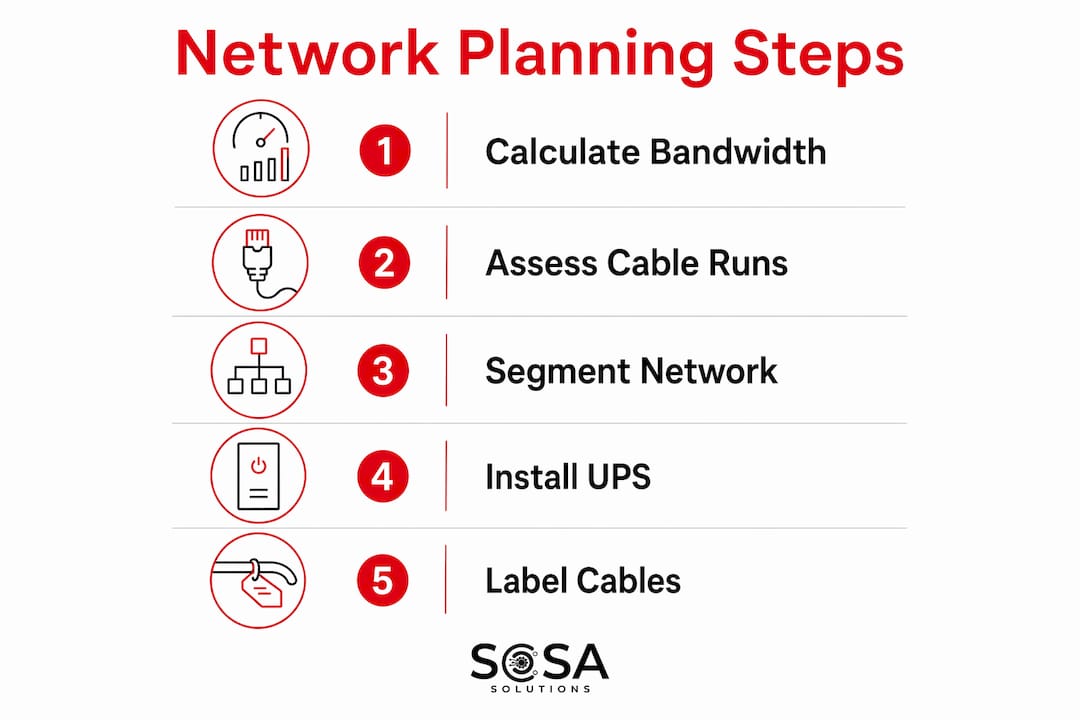
Network segmentation is non-negotiable for any store that takes cards. VLANs or VPNs separate camera traffic from POS systems and guest Wi-Fi. This meets PCI DSS requirements and prevents a compromised camera from becoming a path into the payment network. Set up the camera VLAN before the first camera goes online.
Power backup protects the investment. UPS units for NVRs and PoE switches should deliver 2–4 hours of runtime during an outage. Without a UPS, a brief power cut corrupts active recordings and can damage NVR hard drives. For a deeper look at sizing and selecting backup power, the retail IT infrastructure guide from Sosasolutionsnyc covers the full hardware planning process.
Pro Tip: Label every cable at both ends with the camera number and switch port before closing walls or ceiling tiles. A labeled infrastructure cuts troubleshooting time from hours to minutes.
What is the process to integrate AI analytics with existing retail cameras?
AI analytics do not require replacing cameras or rebuilding the network. Edge-appliance deployments connect via RTSP/ONVIF to existing IP cameras, adding intelligence without new cabling or major reconfiguration.
The deployment process follows six steps:
Pre-deployment audit. Review camera footage for resolution, frame rate, and angle quality. Cameras with obstructions, poor lighting, or angles below 15 degrees from horizontal will produce unreliable AI results. Fix these issues before installing the appliance.
Edge appliance installation. Mount the GPU-accelerated edge unit in the server room or back office. Connect it to the camera VLAN via the existing PoE switch.
Camera stream ingestion. Pull RTSP streams from each camera into the appliance. Configure resolution and frame rate per camera based on zone priority.
Alert configuration. Set detection zones, sensitivity thresholds, and alert routing. Registers and exits get the highest sensitivity; stockroom aisles get lower thresholds to reduce false positives.
POS integration. Connect the analytics platform to the POS system to flag scan-avoidance events in real time. This step alone typically delivers the fastest measurable return.
Staff training and runbook creation. A documented runbook for handling alerts prevents over-reliance on one person’s knowledge. Train at least two staff members per site on alert review and escalation procedures.
Modern AI store installations go live in under 10 days for a standard 40-camera store using a hybrid edge-to-cloud architecture. That speed is only achievable when the pre-deployment audit is thorough and the network is already segmented.
Pro Tip: Run the AI system in “observe only” mode for the first two weeks. Collect alert data before activating notifications. This lets you tune thresholds based on real store behavior instead of guessing.
How to optimize storage and recording policies for video retention?
Storage is the most underestimated cost in a retail surveillance setup. Retailers who record everything at maximum quality fill NVRs within days and face expensive hardware expansions.
The fix is a tiered recording policy. Continuous recording applies to high-risk zones like registers, entrances, and exits. Motion-based recording applies to aisles, stockrooms, and parking areas. This split cuts total storage consumption significantly while keeping full coverage where it matters most.
Retention targets depend on your risk profile and local regulations. A 14-day retention window suits low-risk stores with fast incident reporting. A 30-day window covers most retail environments and gives loss prevention teams enough time to investigate flagged events. A 60-day window applies to high-theft locations or stores with regulatory requirements for extended records.
Zone | Recording Type | Retention Target | Storage Impact |
Registers and POS | Continuous | 30–60 days | High |
Entrances and exits | Continuous | 30 days | High |
Sales floor aisles | Motion-based | 14–30 days | Medium |
Stockroom and back office | Motion-based | 14 days | Low |
Parking lot | Motion-based | 7–14 days | Low |
NVR sizing follows from this table. Calculate total daily storage per zone, multiply by retention days, and add 20% headroom for growth. H.265 encoding reduces file sizes by roughly half compared to H.264, so confirm your cameras support it before finalizing storage estimates.
What common IT setup challenges should retailers expect?
Every retail surveillance installation hits at least one of four recurring problems. Knowing them in advance cuts resolution time dramatically.
Network dropouts. The most common cause is a poorly terminated Cat6 connector, not a faulty camera. Test every cable run with a cable certifier before mounting cameras. A failed crimp at a patch panel can drop an entire camera segment.
Blind spots. Failing to map priority areas like POS registers and stockroom doors before installation creates gaps that no camera resolution can fix after the fact. Walk the floor with a site map and mark every coverage zone before drilling a single mount.
AI false positives. A new AI system in a busy store will fire too many alerts in the first week. This is normal. Lower sensitivity thresholds on low-risk zones and raise them only on confirmed problem areas. Track false positive rates weekly for the first month.
PoE switch overload. Retailers often add cameras to existing switches without checking port wattage budgets. A PoE+ switch rated at 30W per port will throttle or drop cameras if the total draw exceeds the switch’s power budget. Check the switch’s total power budget, not just per-port specs.
For multi-site retailers, the biggest long-term risk is inconsistent configurations across locations. Standardize camera models, NVR firmware versions, and VMS settings across all stores. This makes remote troubleshooting faster and reduces the chance that one site’s misconfiguration creates a security gap. The retail IT troubleshooting guide from Sosasolutionsnyc covers multi-site standardization in detail.
Pro Tip: Keep a configuration export of every NVR and VMS setting after initial setup. If a device fails or resets, restoring from a saved config takes 20 minutes instead of a full day.
Key Takeaways
A successful retail surveillance IT setup depends on layered hardware, segmented networks, tiered storage, and AI analytics tuned to real store behavior rather than default settings.
Point | Details |
Layer hardware correctly | IP cameras, PoE switches, NVRs, and edge AI appliances each serve a distinct role. |
Segment the network | Separate camera VLANs from POS and guest Wi-Fi to meet PCI DSS requirements. |
Plan bandwidth before buying | HD cameras need 2–4 Mbps each; 4K cameras need 8–15 Mbps. Size the network first. |
Use tiered recording policies | Apply continuous recording to registers and entrances; use motion-based recording elsewhere. |
Document everything | Runbooks and labeled infrastructure reduce troubleshooting time and prevent knowledge gaps. |
What I’ve learned from retail surveillance installs that most guides skip
The installs that go wrong almost never fail because of bad hardware. They fail because someone skipped the site audit or assumed the existing network could handle the load.
The most expensive mistake I see is retailers who buy cameras first and plan infrastructure second. By the time they realize the existing switches can’t handle 4K streams or the cable runs exceed 328 feet, the cameras are already mounted and the budget is spent. A two-hour site walk with a cable tester and a bandwidth calculator prevents that entirely.
The second pattern worth calling out: AI analytics get blamed for poor performance when the real problem is camera placement. An AI system cannot detect scan avoidance if the register camera is mounted at the wrong angle or the lens is partially blocked by a display. The technology works. The pre-deployment audit is what makes it work in your store.
The trend worth watching in 2026 is the shift toward edge computing that requires almost no cloud dependency. Cloud-based video surveillance is projected to surpass 50% market share by end of 2026, but the most practical deployments for mid-size retailers combine local edge processing with cloud dashboards for remote access. That hybrid model gives you speed and resilience without betting everything on internet uptime.
Finally, measuring success matters as much as the setup itself. Loss prevention KPIs like shrink reduction and incident response time tell you whether the system is actually working. Camera specs do not. Set baseline measurements before go-live and review them monthly. That discipline separates retailers who get real value from surveillance from those who just have cameras on the wall.
— Christopher
Sosasolutionsnyc handles retail surveillance IT from planning to go-live
Retail surveillance projects involve more moving parts than most IT teams expect, especially when AI analytics, network segmentation, and multi-site management are all in scope at once.

Sosasolutionsnyc specializes in retail IT infrastructure for stores across New York and Florida, including full surveillance system deployments from site audit through ongoing monitoring. The team handles camera placement planning, network segmentation, NVR configuration, and AI analytics integration as part of a managed service. For retailers opening new locations, the store opening IT solutions package includes surveillance setup as part of a complete infrastructure readiness program. Contact Sosasolutionsnyc through the website to request a consultation or get a quote for your store.
FAQ
What is a retail surveillance system IT setup?
A retail surveillance system IT setup is the process of installing and configuring cameras, network equipment, storage devices, and software to monitor a retail store. It includes network planning, camera placement, NVR configuration, and integration with analytics or POS systems.
How much bandwidth does a retail security camera system need?
HD cameras require 2–4 Mbps each, and 4K cameras require 8–15 Mbps each. A 20-camera 4K system needs up to 300 Mbps of dedicated internal bandwidth, which requires a separate camera network segment.
How long does it take to install AI analytics on existing retail cameras?
A standard 40-camera store using a hybrid edge-to-cloud system typically goes live in under 10 days. That timeline assumes existing cameras support RTSP/ONVIF protocols and a pre-deployment audit has been completed.
What is the best recording policy for retail video storage?
Apply continuous recording to registers, entrances, and exits, and use motion-based recording for aisles and stockrooms. Set retention targets of 30 days for most retail environments, adjusting to 60 days for high-theft or regulated locations.
Why is network segmentation required in a retail surveillance setup?
Network segmentation using VLANs or VPNs separates camera traffic from POS systems and guest Wi-Fi. This separation meets PCI DSS compliance requirements and prevents a compromised camera from creating a path into the payment network.
Recommended


Comments