Cloud Backup for Retail: What Every Store Owner Must Know
Updated: Aug 7

Cloud backup for retail is defined as the automated, offsite copying of store data to third-party cloud servers, protecting point-of-sale records, inventory data, and customer information from loss, ransomware, and hardware failure. Understanding what is cloud backup retail means recognizing it as a core business continuity tool, not just an IT checkbox. Retailers who lose access to transaction data during a system failure face immediate revenue loss and potential compliance violations. The 3-2-1-1-0 backup strategy, the current industry gold standard, requires three copies of data across two media types, one offsite, one immutable, and zero unverified restores. This guide breaks down how cloud backup works, why it matters for retail, and how to build a strategy that holds up under real pressure.
What is cloud backup in a retail environment?
Cloud backup in retail is the process of copying critical store data to remote cloud servers managed by a third-party provider, separate from your on-site systems. The industry term is “cloud-based data backup,” though retail operators often call it simply cloud backup. The distinction from general cloud storage matters: cloud backup creates versioned, restorable snapshots of your data, while cloud storage simply syncs files.
Retail data types that require backup include POS transaction logs, inventory databases, employee records, customer profiles, and compliance documentation. Each of these carries different sensitivity levels and recovery priorities. A corrupted POS database during peak hours costs money by the minute. A lost compliance record can trigger regulatory penalties weeks later.

The 3-2-1-1-0 rule is the recognized standard for retail data protection. It requires three copies of data, stored on two different media types, with at least one offsite copy, one immutable or air-gapped copy, and zero unverified restores. That last requirement is the one most retailers skip, and it is the one that causes recovery failures during actual crises.
How does cloud backup work for retail businesses?
Cloud backup for retailers follows a structured process that runs largely in the background of daily operations. The system captures data changes at defined intervals, encrypts that data, and transmits it to remote cloud servers. Three backup types handle different recovery needs.
Full backup copies all selected data from scratch. It takes the most time and storage but provides the cleanest restore point.
Incremental backup captures only data changed since the last backup of any type. It runs fast and uses minimal storage, making it ideal for hourly POS transaction captures.
Differential backup captures all changes since the last full backup. It sits between full and incremental in both speed and storage use, and it simplifies the restore process.
Retail operations benefit most from a layered schedule: hourly incremental backups for live transaction data, daily differentials for inventory and configuration files, and weekly full backups for complete system snapshots. Automating backups to run after business hours captures POS logs, inventory counts, and compliance records without disrupting store operations.
Immutability and air-gapped backups
Immutable backups use object-lock WORM (Write Once, Read Many) storage to prevent any modification or deletion, even by administrators. This matters because ransomware attacks increasingly target backup systems after compromising primary data. Without immutability, attackers who steal cloud credentials can wipe your backups before you even know an attack is underway.
An air-gapped backup goes one step further by physically or logically isolating a copy from any network connection. For retail businesses handling payment card data or customer personal information, air-gapped copies provide a last line of defense that no remote attack can reach.
Pro Tip: Never confuse cloud storage sync tools with cloud backup. If ransomware encrypts your primary files and your sync tool is active, it will push the encrypted versions to your cloud storage, overwriting clean copies. True cloud backup systems maintain versioned snapshots that sync tools do not.
What are the advantages of cloud backup for retail businesses?
Cloud backup delivers concrete operational advantages that on-premise tape or local drive backups cannot match. The most direct benefit is business continuity. Retailers must define their Recovery Time Objective (RTO) and Recovery Point Objective (RPO) based on how long they can afford to be closed, not on generic vendor promises. A store that loses $5,000 per hour during downtime needs a fundamentally different backup configuration than one that can tolerate a four-hour outage.
Key advantages of cloud data storage for retail businesses include:
Ransomware protection. Immutable cloud backups survive attacks that destroy local copies.
Granular restores. Retailers can recover a single deleted customer record without restoring an entire database.
Multi-store management. Unified management interfaces let IT managers enforce consistent backup policies across every location from a single dashboard.
Compliance readiness. Versioned backups with audit logs support privacy regulation requirements and payment card industry standards.
Cost reduction. Cloud backup eliminates the capital expense of tape libraries, offsite storage contracts, and dedicated backup hardware.
Scalability. Storage capacity grows with your business without hardware procurement cycles.
Retailers using SaaS platforms like e-commerce or inventory management tools should not rely on those platforms’ built-in recovery features. Built-in tools typically lack granular item-level control and cannot protect against accidental deletions or configuration errors. Supplemental cloud backup fills that gap.
The cost argument for cloud backup over on-premise systems is straightforward. On-premise backup requires hardware refresh cycles, physical security, and dedicated IT staff time. Cloud backup shifts those costs to a predictable monthly subscription while adding geographic redundancy that no single-location hardware setup can provide.
What are best practices for retail cloud backup and disaster recovery?
Retail disaster recovery planning starts with a clear separation between High Availability (HA) and Disaster Recovery (DR). HA and DR serve different functions: HA handles localized failures like a crashed server or failed network switch, while DR addresses catastrophic events including ransomware, fire, or regional outages. Retailers who treat HA as a substitute for DR discover the difference at the worst possible moment.
Recovery concept | What it covers | Retail example |
High Availability (HA) | Localized system failures | Failover to a backup server when POS crashes |
Disaster Recovery (DR) | Catastrophic or widespread events | Restoring all store data after ransomware attack |
RTO | Maximum acceptable downtime | Store must reopen within 2 hours |
RPO | Maximum acceptable data loss | No more than 1 hour of transaction data lost |
Building a retail disaster recovery plan requires four concrete steps.
Define RTO and RPO for each system. POS systems need aggressive targets. Back-office reporting systems can tolerate longer recovery windows.
Follow the 3-2-1-1-0 rule. Three copies, two media types, one offsite, one immutable, zero unverified restores.
Test restores every 90 days. Periodic restore testing validates that backups actually work and that all dependencies, including database configurations and secrets metadata, are captured correctly.
Document recovery procedures. Written runbooks let any qualified IT staff member execute a recovery without relying on institutional memory.
A common pitfall for multi-location retailers is configuration sprawl. Each store accumulates slightly different backup schedules, retention policies, and exception lists. Over time, these inconsistencies create gaps. A centralized IT management approach with a single-pane-of-glass dashboard closes those gaps by enforcing uniform policies across all locations.
Pro Tip: An untested backup is a false sense of security. Schedule a full restore drill at least once per quarter, using a non-production environment. Document every failure, missing dependency, and recovery gap you find. Fix them before a real incident forces the issue.
How to implement cloud backup solutions in retail environments
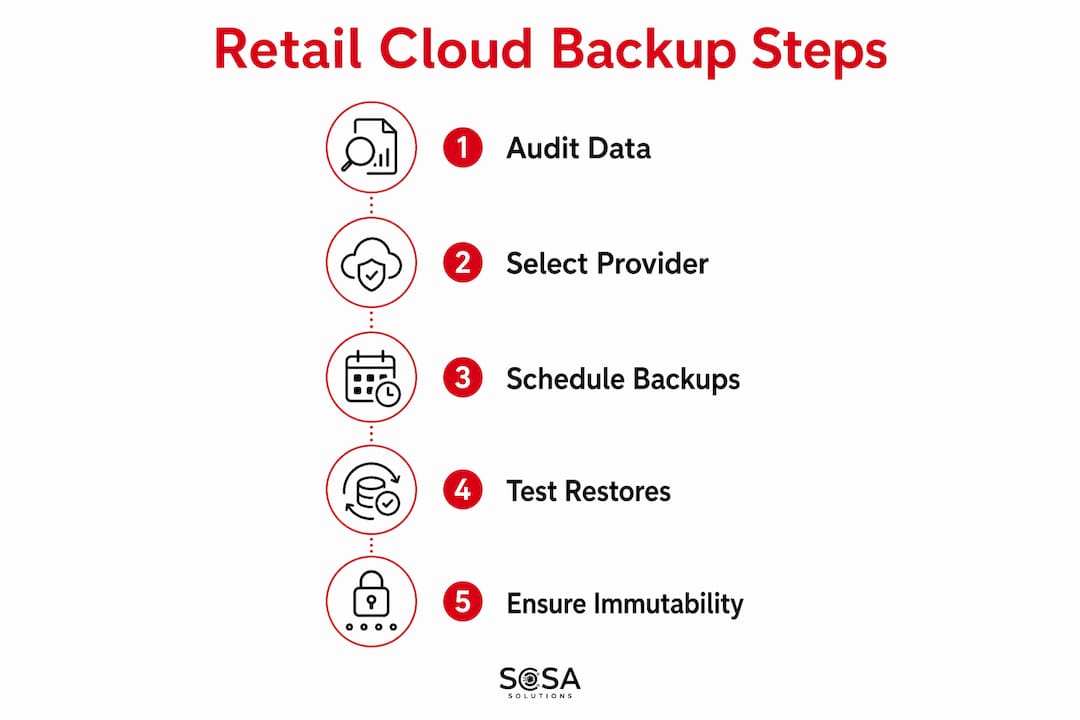
Effective cloud backup retail business setup starts with a data audit. Before selecting any platform, map every system that generates data your store cannot operate without. That list typically includes POS terminals, inventory management databases, e-commerce platforms, employee scheduling systems, and customer loyalty program data.
Assess data sensitivity and recovery priority
Not all retail data carries equal weight. POS transaction records and payment data require the highest protection and fastest recovery. Inventory snapshots need daily backup at minimum. Marketing assets and historical reports can tolerate longer recovery windows. Ranking your data by recovery priority before configuring backup schedules prevents over-engineering low-priority systems while under-protecting critical ones.
Choose a provider with immutability and compliance features
When evaluating cloud backup providers, prioritize immutable storage support, end-to-end encryption, and documented compliance with relevant data privacy standards. Verify that the provider supports granular restores, not just full-system recovery. Ask specifically whether their platform captures databases, configuration files, and SaaS exports as part of a complete restore package.
Integrate with existing retail IT infrastructure
Cloud backup must connect cleanly to your existing systems. For retailers running hybrid cloud architectures, backup agents need to cover both on-premise servers and cloud-hosted workloads. SaaS platforms require dedicated connectors or API-based backup tools to capture item-level data that platform-native tools miss.
Scheduling matters as much as coverage. Configure backups to run outside peak trading hours. For most retailers, that means late-night or early-morning windows. Review and update backup policies whenever you add a new system, open a new location, or change your POS platform. Backup configurations that matched your business a year ago may leave gaps today. For a detailed look at retail data protection needs, the specific requirements for each store type vary more than most owners expect.
Key Takeaways
Cloud backup for retail is only as reliable as the restore process behind it. Retailers who back up data without testing recovery procedures are not protected.
Point | Details |
Follow the 3-2-1-1-0 rule | Keep three copies, two media types, one offsite, one immutable, and verify every restore. |
Define RTO and RPO first | Set recovery targets based on your actual downtime cost before choosing any backup platform. |
Immutability stops ransomware | Object-lock WORM storage prevents attackers from deleting backups even with stolen credentials. |
Test restores every 90 days | Untested backups fail silently. Quarterly drills catch missing dependencies before a real crisis. |
Centralize multi-store management | A single-pane-of-glass dashboard enforces consistent policies across all retail locations. |
Why most retailers are one incident away from a real problem
I have worked with retail IT environments long enough to know that the gap between “we have backups” and “we can actually recover” is wider than most owners realize. The retailers who feel most confident are often the ones running the highest risk. They set up a backup solution during their store opening, never revisited it, and assume it still covers everything they added since.
The single biggest misconception I see is treating cloud storage sync as cloud backup. A retailer syncing their POS exports to a shared drive or a file storage service is not protected. The moment ransomware hits, the sync pushes encrypted garbage to the cloud and overwrites the clean version. Real backup systems maintain versioned snapshots with retention policies that sync tools simply do not offer.
The second issue is the HA versus DR confusion. Retailers invest in redundant servers and fast failover, then discover those systems do nothing when ransomware encrypts the primary and the replica simultaneously. High availability keeps you running through hardware failures. Disaster recovery gets you back after something truly destructive. You need both, and they require separate planning.
What I find encouraging is that the tools available to small and mid-size retailers today are genuinely good. Immutable cloud backup, automated scheduling, and centralized dashboards are no longer enterprise-only features. The barrier is not technology. It is the discipline to test, document, and update backup policies as the business grows. That discipline is what separates retailers who recover in hours from those who spend days rebuilding from scratch.
— Christopher
Sosasolutionsnyc: managed cloud backup for NY and FL retailers
Retail IT environments in New York and Florida carry specific pressures: high transaction volumes, multi-location complexity, and strict compliance requirements. Sosasolutionsnyc builds and manages cloud backup infrastructure for retail businesses across both markets, from single-location boutiques to growing chains.

Sosasolutionsnyc handles the full setup, including backup scheduling, immutability configuration, restore testing, and ongoing monitoring. Retailers working with Sosasolutionsnyc get a backup strategy aligned to their actual RTO and RPO requirements, not a generic template. Whether you are opening a new store or auditing an existing IT setup, managed IT services from Sosasolutionsnyc give you a team that treats your data protection as seriously as you do. For new locations, store opening IT solutions include cloud backup infrastructure from day one.
FAQ
What is cloud backup in retail?
Cloud backup in retail is the automated process of copying store data, including POS records, inventory, and customer information, to remote cloud servers for protection and recovery. It differs from cloud storage by maintaining versioned, restorable snapshots rather than simple file sync.
How often should retailers back up their data?
Retailers should run hourly incremental backups for live transaction data and daily backups for inventory and configuration files. The 3-2-1-1-0 standard also requires at least one immutable copy and verified restore testing every 90 days.
What is the difference between RTO and RPO for retail?
RTO (Recovery Time Objective) is the maximum time a store can be offline before the business impact becomes unacceptable. RPO (Recovery Point Objective) is the maximum amount of data loss, measured in time, that the business can tolerate after a failure.
Does cloud backup protect against ransomware?
Immutable cloud backups using object-lock WORM storage protect against ransomware by preventing any modification or deletion of backup copies, even if attackers compromise cloud credentials. Standard cloud storage sync does not provide this protection.
Do SaaS retail platforms include sufficient backup?
SaaS platforms typically offer limited built-in recovery tools that lack granular item-level control. Supplemental backup solutions are necessary to protect against accidental deletions and to enable non-destructive restores of individual records.
Planning a safer cloud or backup setup? Explore our Microsoft 365 and cloud services for migration, protection, and ongoing support.
Recommended


Comments